Monday, 17 November 2014

MTN New 4.5GB For N2500,Surprise Season Greetings

Still on the promo. MTN want to surprise all mobile users with this cheap data plan most especially Android user, MTN has come up with a new data bundle, which allows All device user to browse the Internet at Cheap rate. I guess Nigeria is coming to more advance level.


How to activate the date plan
Text 120 to 131
The data goes for N2500 for 4.5GB
To check your data balance Text 2 to 131
Advantage Of The New Data Plan.
==It works on devices such as, PC, Tablet, IPad, Apple, BB10,Android, Windows, Symbian and Java.
==You can browse with it all day and night
==The data charge is very low
What are you waiting for, Enjoy This Season with many surprise!!!!!!

Enjoy MTN Akanchawa For Better For Best

MTN introduced new tariff plan called Akanchawa, the name sounds funny. Anyway the tariff plan is part of the MTN surprise promo,MTN is willing to bring out more surprise this Christmas .The Benefits of these plan includes:
==10minutes
==10 SMS to all networks 
==4MB data for internet use

How To Activate Akanchawa Plan
Dial *311*PIN# to load Akanchawa Recharge
To check your balance, dial *312#
Guess what? I made more then 50 minutes with this Akanchawa, yet my credit is still there for me.
What do you think about all this surprise from MTN NG ?

Sunday, 16 November 2014

Airtel Rocking, Enjoy This Surprise

I cant really tell what this surprises is all about I just downloaded a file of 40gb with airtel sim yet I don't have data nor credit.
I don't need to write much on this post, just put your airtel sim and enjoy.!!!!!!!

Friday, 14 November 2014

Tips To Improve Your Site/Blog Loading Speed For Beginners

Knowing the loading time/speed of your site/Blog is one of the vital role any webmaster/Blogger needs to consider, because your site/Blog loading speed determines how long readers will stay on your site or want to read your post. Poor landing site/Blog scares the readers away from your site.

*Below are some tips to improve your site loading speed. *
1) Reduce the number of your post body to 7
2) Make sure to use blogger gadget or Google recommended gadget.
3) Always resize the images on your post before publishing.
4) Keep all third party Javascript and links at the bottom of your sidebar
5) If you've added any custom CSS to your blog, make sure you put it at the top of the page or at the bottom.
6) Make all vital parts or post on your site/Blog to load faster, because that is the center of attraction, that would attract more readers
7) Don't use multiple image on one post, if you  want multiple image, we recommended that you upload your images to Picasa Web Album and copy the Url to your post.
8) You can check your site speed and time it take to load with Stopwatch, is a Javascript site that will display the  information on your site and the time it takes to load
If you have any questions concerning the above post, we would be happy to hear your thoughts through the comment box

Wednesday, 12 November 2014

How To Install Fonts On Android device

Hello,........ I would like to share with you all some font customizing tips, customizing is a part of the fun. Have you been browsing all day looking for a way to install fonts on your Android device? Don't worry, you are on the right place.... Just a few steps!

Requirements
==Android device
==Rooted Device. Learn how to root here
==ifont or any other one

Note!!!
I recommended that you backup your phone before taking any step below.
Steps on how to install fonts on your Android device.

== Download ifont donation here
== install it and move to internal memory (phone memory)
== lunch the ifont browse through the font and download the one you would love to set on your Android device. When that is done, the event would ask you to reboot, click OK to reboot. After that your phone will come up with a new font look. You can as well test other font in ifont


Don't be a wallflower, Please let me know if you encounter any problem doing the above procedures.

Wednesday, 5 November 2014

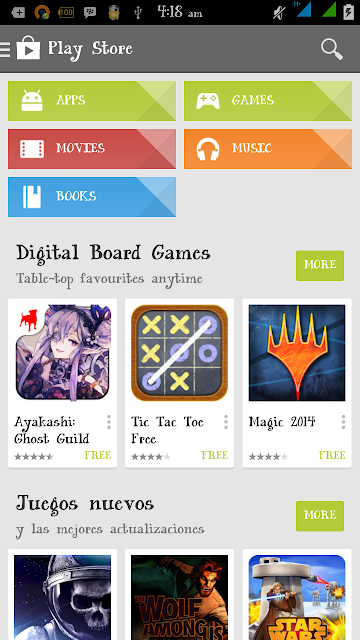
Google Play store Updated Check Out

Nice update from Google, play store is more attractive now and has many cute categories with beautiful tags
Such as :

=== Digital Bord Games
=== Jeugos Nuevos
=== Recommend
=== Popular singles
And many more tags, you need to check it out so amazing and hope you would love the update
Share your thoughts!!!!!!

How To Stop Background Running Apps On Android Phones

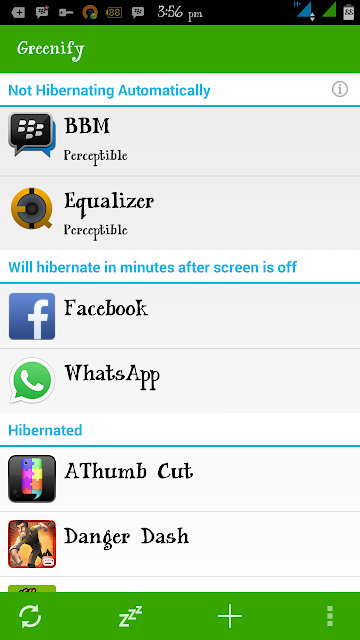
Hello through my research yesterday I was able to come up with this amazing app called Greenify. Greenify is one of the best power saving apps, as well block background running app from wiping your data. It gives you the ability to turn off some app making you  the master guide of your phone. 

How To Install 
1 Download Greenify Donation Here
2 Download and install Xposed installer:http://goo.gl/CKTWXZ3. Install the “Framework" in the "Xposed Installer" and activate "Greenify" in "Modules".
3 Reboot
4 Select "Experimental features" from the main menu of Greenify, enable whatever features you want.
Experimental Features 
Boost mode
Android framework is patched to allow Greenify to perform hibernation and other operations without the root routine, which is usually buggy (for some root tools) and slow.
Allow (mostly) system appears to be greenfield in Greenify
Android framework is patched to deprive system apps of immunity to hibernation.Beware, most system apps are critical to the basic functionality of your device, once greenfield, you may lose some part of usability. If something bad happens, degreenify the system apps you recently greenfield and reboot, or deactivate this experimental feature of Greenify and reboot.
Allow GCM push message to wake hibernated apps
The Google service framework is patched to allow the GCM (Google Cloud Message, a.k.a. C2DM) broadcast to wake the hibernated apps, thus you can greenify some apps without losing the ability to receive push message.
Attention: Not all apps use GCM as push mechanism, some apps create their own connection for push in background service, thus can't benefit from this patch and their push messages can never survive hibernation. Please DO NOT ask for that, it's just a "mission impossible" in practice. Instead,ask their developer to adopt the more RAM-and-battery-friendly GCM push.
Keep Notifications after Hibernation
Android framework is patched to keep notifications from being removed when application hibernates.
Wake-up Tracker
Android framework is patched to track which app implicitly woke your hibernated apps. You can decide whether to cutoff the wake-up path to avoid further wake-ups.
Block App State Abuse.
Block the abuse (via a vulnerability of Android up to 4.2) used by some apps to keep themselves from being killed by Android. This abuse leads to undesired apps "Not Hibernating" due to false "Perceptible" state in Greenify.
PS: For Android 4.3+, this can also remove the annoying permanent notification from some apps, which was hidden in pre-4.3 system.
Why do I need to install another framework for all these to work? 
Since these experimental features all need OS level patches, traditionally they can only be applied with ROM Modding, which device is highly-specific and ROM-exclusive. Xposed framework is a new hope to do fine grained tiny patches in a ROM-independent way. Thanks to Xposed framework, you can enjoy these experimental features of Greenify without replacing your ROM.
If you have any problems installing it, please comment for a help.