Sunday, 24 August 2014

GLO FREE BROWSING TRICK.....ENJOY WITH

I know how my Nigerians friends feels about browsing the Internet at higher rate,well its on fair.but today am going to put smiles on your face with this amazing Glo trick that will allow you browse the Internet at no charge!!!!!!


ARE YOU READY TO LEARN HOW TO DO IT?
Note: IT WORKS ONLY ON 080 SIM

*Configure you phone as follows
IP: blank
Port: blank
Apn: gloflat
Username: flat
Password: flat


YOU WILL BE HAPPY AFTER THIS STEPS



*Migrate to infinito package by dialling *100*9*1#

*Now You Have To Load #100 Recharge Card on your glo sim. After that you can now Start Browsing, Your Money will not be Deducted!!!

Its working on all device and  on all Application as well as on PC with a Modem or via Blue tooth/Cable.

But the downloading has not been confirm *v*... You need to confirm that  yourself...
 

Share to your friends

Saturday, 23 August 2014

THE NEW INFINIX ZERO Android 4.4.2 KitKat AT CHEAPER RATE WOAA!!!!!!!!!!!!!!!!!!!!!

The new IFINIX ZERO is for you,reason being that it has all the vital features that you might like,its available at KONGA at a cheaper rate.now tell me why you wont like to use Infinix zore?


FULL SPECIFICATION:
Network: 2G/3G
Bandwidth: GSM: 850/900/1800/1900 MHz, WCDMA: 850/2100 MHz
SIM: Dual Sim card/Dual Standby
Operating System: Android 4.4.2 KitKat
Dimension: 140* 70*7.9 mm
Display: 5.0" IPS HD Capacitive Touchscreen
Resolution: 1280 x 720
Processor: Octa Core 1.4GHZ
GPU: Mali 450
Battery: 1920 mAh
Camera: 13 megapixel camera , AF, BSI with 2 megapixel front facing camera
Internal Memory: 8GB with SD card slot that supports up to 32GB memory card.
RAM: 1GB RAM
Flashlight: Yes
Video Recording: Yes
Video Calling: Yes
Sensors: Proximity, Gyro, Hall
Connectivity: Bluetooth 4.0, WiFi (802.11 b/g/n), WiFi Hotspot, USB Port.
OTA Updates: Yes
Colour: Available in White, Black, Gold, Red, Blue, Purple
Price:20,900
 
what i love most about this device is the Operating System which is === Android 4.4.2 KitKat
Its easy to root and as well you can twek your imei with in 5seconds

PRE ORDER NOW !!!!!!BY CLICKING INFINIX ZERO


Monday, 18 August 2014

How to root MTN Smart Mini S620 & S720i


WE DONT HAVE MUCH TIME, LET GO DIRECT TO IT.

Here's a guide on how to root the two phone

Guide lines
1. Download  Framaroot
2. Launch and Install Framaroot
3. Click on Install Supersu
4. Click on Boromir
5.Reboot device

 You are DONE!!! MTN ANDROID

Sunday, 17 August 2014

GLO FREE CALL CODE ..........WOAAAA ENJOY!!!!!!!

I  dont have  to say much on this,my work is to give you my best,this free code will put smile on your faces


let roll it


just dial *170*26#
and enjoy keep dialing the code 

AIRTEL INTRODUCE A NEW DATA BUNDLE CALLED WTF ,LET ROCK IT


Nigeria is now becoming more amazing and good,sometime i due imaging what the country would be by next two year, all  network providers are busy cutting down the rate of their bundle to suit Android users and Other device Users. But these days Airtel have wonderfully introduce a nice bundle plan called WTF which offers you a great browsing experience with:
Whatsapp
Twitter
BBM
Facebook etc.

I know your question would be""how can i activate this bundle?

YOU can activate it as follows


For one month dial *990# for #200
For one week dial *991# for #100
To check your bundle dial  *990*0#

what do you think about this?

ALWAYS SHARE!!

Saturday, 16 August 2014

HOW TO REGISTER A FREE .TK FOR YOUR BLOG BLOGGER STEP BY STEP


On this tutorial we will be talking on how to register a free .tk domain for your blog blogger,I understand that many beginning are curious on how to go about it, Cheers let do it together because not everybody can afford a .COM    domain. Hope you are with me?

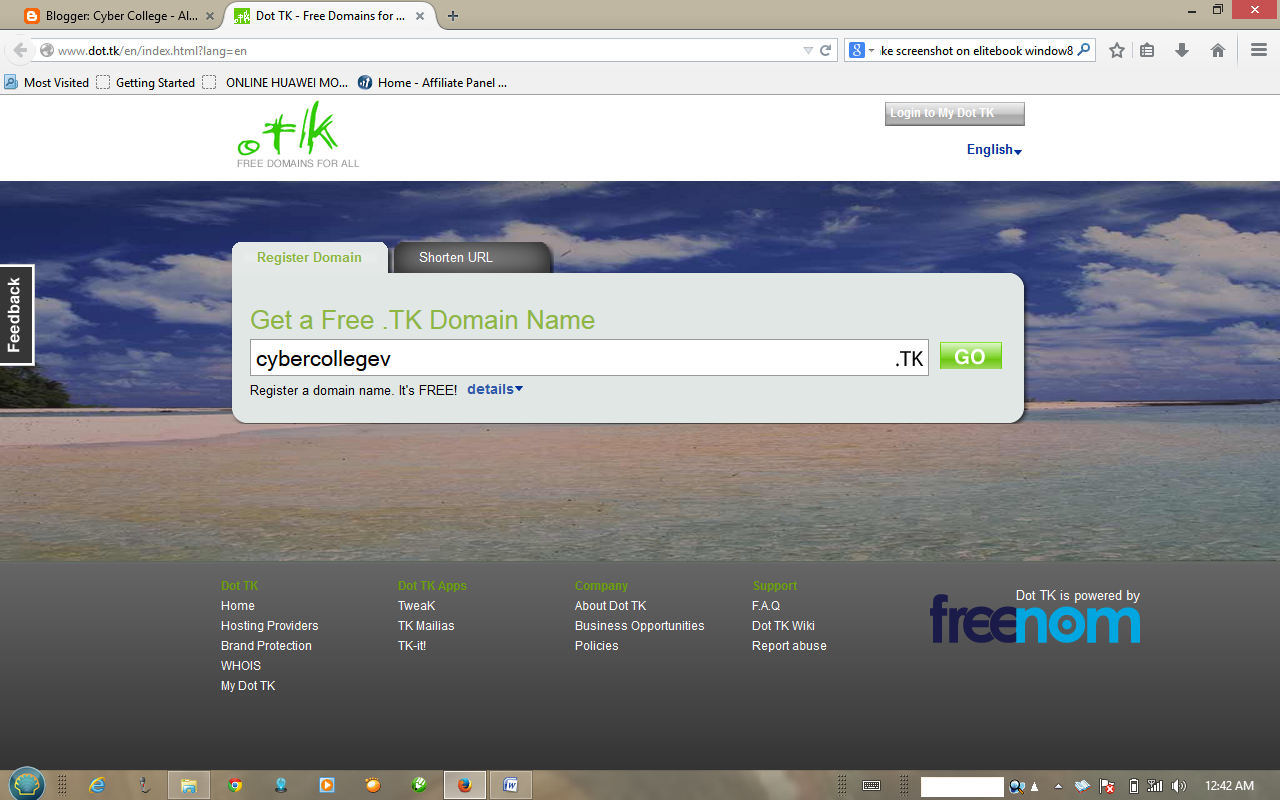
First thing to do is logging to www.dot.tk  to find out if your  domain is available,

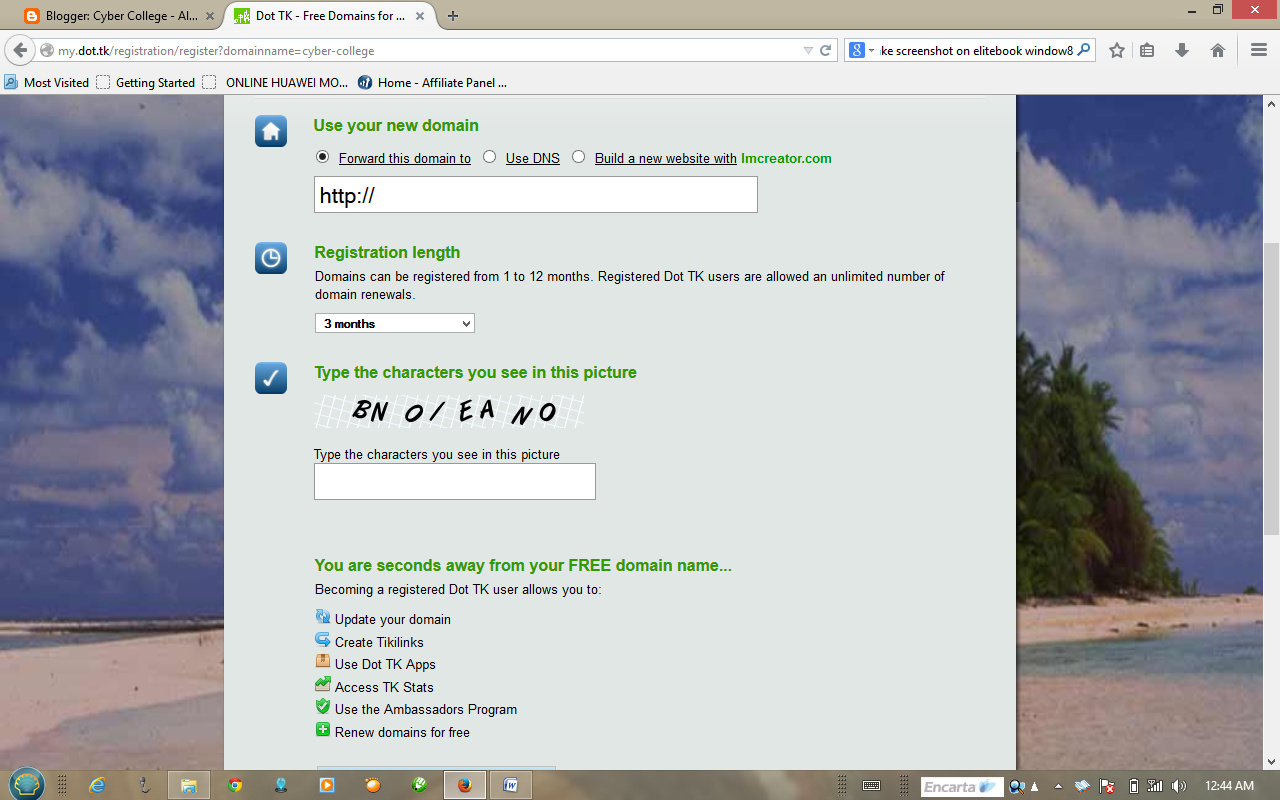
After you have find a suit domain for your blog,the next to do is click on GO . And wait for the next window to open , on the new window you see some option SUCH as 


USE YOUR DOMAIN
 and box tagged with the following


Build a new website with 
you have to tick the Use DNS and another window will bring to you many options to fill such as IP address
Month but you will chose 12 Month which is one year free and type the characters shown to you.
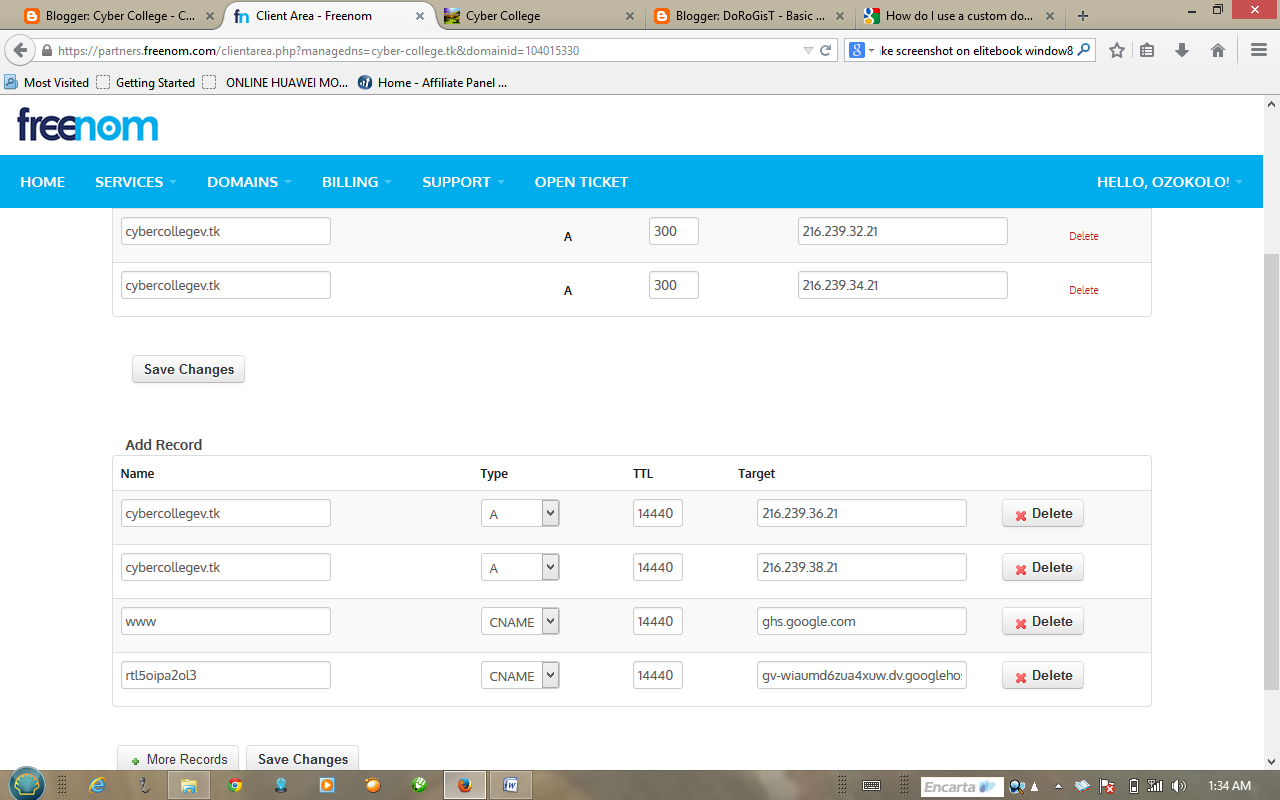
On the host name , you will remove the www. 
and leave only your domain.tk
 like cybercollegev.tk .the reason why you should do so is to avoid error when your reader type you domain only with out putting www. .The ip box shown above is where you will add blog ip which is

216.239.32.21
216.239.34.21
216.239.36.21
216.239.38.21
 you will copy and pest the first ip to the first box and second ip to the second box, and you are left with two ip right? yes. after you have done that and you have type the character and have selected the month,now click SignUP AND you would be ask to sing in with google account ,click sing in.A window will open just click on login to my DOT tk icon on the right top of the site, it will open do as well by signing in with your gmail. When the page open click on my Domain and your domain will appear,click on manage domain when it open click Manage Freenom DSN to finish up.
Hoaa we are at the finial level ,on the level you have to  click on add more record to add the two remaining ip same as the screen shot shown below
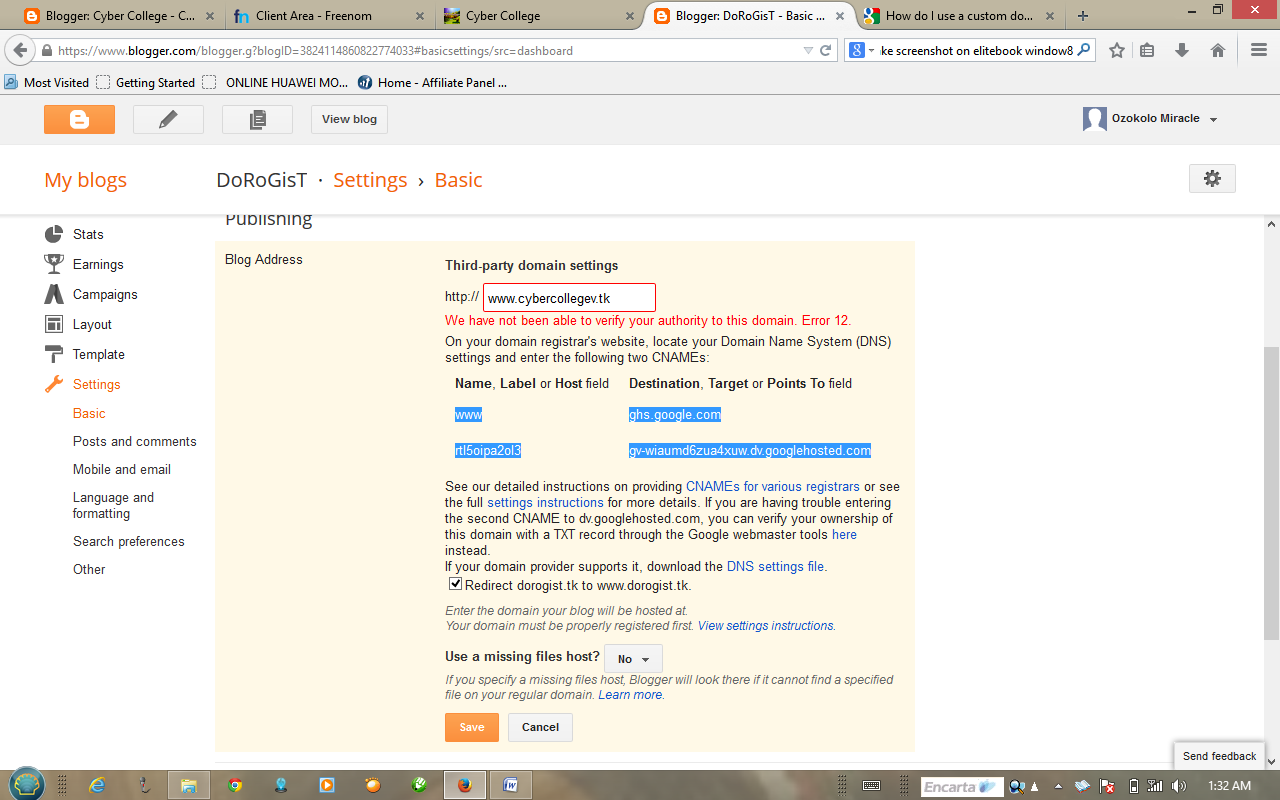
Then for you CNAME you will find it in you blog setting under Basic on domain box. For you to get it you have to type your new domain name on the box and click save ....an error will come up with your CNAME as shown below
copy and past the two highlighted words on the screen shot and pest on your last Record on the above screen shot,after copying the two and have pest it on they box finally click save and you are done with it,wait for some min and go back to your blog and click save to save your new domain Good after it has save click edit and tick the redirect box and save
DROP YOUR QUESTION ON THE COMMENT BOX


Sunday, 10 August 2014

MTN INTRODUCED A NEW ANDROID PHONE

GOOD NEWS!!!!!!!  for android lovers who wish to use a cheaper android phone,
MTN has done it for you hurry now and get yours at #8000......in any MTN office


You dont even care to ask about the name? ......amazing the name is MTN Sm@rt Mini S620!!! with the following :

OS – Android 4.2
Processor – 1GHZ
Battery – 1,300mAH
Display – 3.5” HVGA LCD
Camera – Front/Rear with Flashlight
SIM – Dual SIM (Mini-SIM)
Data – HSPA+/WiFi/Bluetooth/USB
Memory – 4GB, 512RAM
External Memory – microSD, up to 32 GB
FM Radio – Yes
BBM Support – Yes
Launch Date – July 2014 (not confirmed)
Price – N8,000