Showing posts with label Symbian. Show all posts

Thursday, 13 August 2015

New Update From Facebook (Facebookthanks)

Hello this morning as I  was checking on my Facebook notifications, I came across this  great feature from Facebook called Facebookthanks. I was very excited and I decided  to share with you all about the new update and some of the amazing things about it, below is a screenshot of what I saw this morning


So good and lovely, I strongly believe that 99% of Facebook user would love it, not only that. It would drive more user to Facebook, because many people love, appreciation and Facebook being a smart social provider has given that to their users. The most exciting part of it, is that, you can create a thanks video clip on any browser, such as: PC browser, Mobile browser and on the Facebook app.

You can Watch me Facebook thanks  Video  clip
  
The Question maybe  how can one   create the video clip?  Creating your own thanks video clip is as easy as ABC just visit facebook.com/thanks

Please share your thought about this new update  from Facebook and if you have tried the new feature, kindly share your feeling about it. 

Monday, 4 May 2015

Get Free 150MB On Your MTN Sim Now

Hello, how was your weekend? I hope it was dazzling and a good story to tell? Today i would like to welcome you to this new week with an amazing trick on how to get 150mb on your mtn sim.
How to get 150mb on your mtn sim now
This trick works on all device, so far you have an mtn sim card on your  cell phone. Below is the step to take


HOW TO GET FREE 150MB FROM MTN
Send the keyword  App to 131. And you will get a congratulation message from mtn..

Wednesday, 29 April 2015

How To Upload Videos On YouTube Channel From Mobile Phone

Today I will be writing about how to upload video to a YouTube channel using a YouTube mobile application. YouTube is a platform that allows user of various kind to upload and share videos among other users and for business purposes, such as advertising for new product/goods , comedians for new comedy videos , music videos, local news video etc. 
How to upload video on YouTube With Mobile Phone

In the post I will teach you, step to step on how to upload a video to YouTube channel using android YouTube app, with a clear screenshot for a better understanding

Step 1) Open your YouTube application and click/tap on the YouTube menu, it's located at the top right side of the YouTube app as shown in the image below 
How to upload video on YouTube With Mobile Phone
Step 2) Scroll down and tap on uploads, a new menu  will prompt with an option at the top side. 

Step 3) Tap on the upload icon as indicated on the image below 
How to upload video on YouTube With Mobile Phone
Step 4) An option will prompt for you to select a video, select any one you wish to upload and it will automatically State uploading to your YouTube channel. Once the upload is successful, you will get a notification by gmail to inform that your video is ready to SHARE 

Hope it won't be difficult for you to do? 


Wednesday, 15 April 2015

Latest: Get Upto 100gb On Your Airtel Sim

Hello readers I want you all to use the trick wisely. you can make use of the trick on all Internet enabled device, but the trick can only be done on android device, which you can later make use on other devices

This trick  is all about imie tweaking, i assumed that most of you knows how to tweak imie on android device.?

Requirements For The Trick 
===)  Airtel sim card
===) Android MTK device or any other
===) Moble uncle for MTK device
===) MTK Droid Tools for none MTK device

The Imie To Tweak 

==) 869878000166622 
==) 8698780000157022 
==) 869878000133677
==) 869878000166555
==) 869878000166688

Send Join to 141 and 2gb of data will be given to you 

How to make it work on other Internet enabled device 

You can inset the sim which  you have load gb on any of your device and flex. what I meant about other devices is:
symbian
java
window
Idevice
laptop
tablet etc

kindly Share this post with other airtel users and friends as well as family


Tuesday, 17 March 2015

MTN BIS Is Back And Better,Enjoy The New BBMIDID

Good news!!! MTN BIS is back and better, few days ago was a nightmare to many Android users, but today will be a beautiful dream to you all.. I won't say much on this post, below is all you need to know about the new MTN BIS for Android, Symbian and PC users
How to browse Daily with  mtn bis


How To Active MTN BBMIDID?

===) Load your mtn sim with N100
===) Send BBMIDID to 21600 and with for a welcome message in this format
""welcome you to MTN BBMIDID and your have 15MB. Just ignore it.""

Surprised right? Don't be surprise the 15mb can Download unlimited for a day,

Download Simpleserver and configure as follows :::
>>>Listen port: 8080
>>>Proxy Host: 10.199.212.2
>>>Proxy Port: 8080
>>>Enable Proxy: YES
>>>Injection Method:HEAD
>>>Injection Query: http://web.blackberry.com
>>>Injection Host: web.blackberry.com
>>>Injection line: Just press enter 4 times and
>>>Leave it empty
>>>Click Ok
>>>Enable Injection: Tick to Enable
>>>Buffer Size: 8092
>>>Log Level: DEBUG

Configure Your Access Point To

===) APN: web.gprs.mtnnigeria.net
===) IP: 127.0.0.1
===) Port: 8080

Enjoy and share. 

Saturday, 14 February 2015

How To Get A Valid Imie For Your Eti 1.5gb And Above

I understand that is very difficult for some people to get a valid imie these days, well I want to share this tips with you all, and I hope it would put smiles on your faces


But before I push to the tips, I would like to understand your feelings.

*How do you feel after changing imie to get 1.5gb and you end up getting the device has being used to redeem this offer?

*How do you feel after changing imei and you got a pending request?

*What about you getting  invalid imie?

If that is your problem, believe me it has come to an end,just follow the below proceed and you will become a boss. But before you continue read this

==) Always treat imie with old sim
==) When you get "" the device have already benefited from this offer, know it that the imie is go to go, just inset your new sim and garb the chance 
==) always generate imie with odd numbers for better chance to get it correct 

Below are tips to get more than 1.5gb on one eit  sim 

1.Get a registerd etisalat sim, and do not dial 200 on it, just launch your mobile uncle.

2. Tweak your imei with the Below imei : 353133061356111

3. Now open your message, type "MID" to "8186" twice and you most be fast
But if you got message failed, then Dial 200 and repeat the imei tweaking again.

After doing the above you can do normal note 4 imie or Samsung


Saturday, 7 February 2015

How To Get Free 10Gb With MTN Sim

Many people are struggling to get Gb from eti and airtel but here is another best way to get free mb from mtn without much stress, are you ready to learn this? Would you promise to keep it safe? If yes let throw the bow on the air. Below are the requirements
How to get free 10gb with  mtn sim

=) New or Old mtn sim
=) Imie analysis or you can guess it your self
=) Rooted device, but infinix users can do it without rooting
=) Mobil uncle

STEP 1: Get a new sim or better still use your old sim on any plan

STEP 2: make use of this Samsung imie, it offers you 100mb for each tweak.... Imie 359767053060 complete the last 3*digits

Are you new to imie tweak if yes learn HERE

After changing your imie turn your phone to airplane mode for a mins and turn back

Then after  Send Samsung to 131 and wait for a reply.
Smile and enjoy 😀

STEP 3: After You have been granted the 100mb, dial *559# to check your data balance

NOTE: The more You tweak Your imei, the more your mb accumulates….

I got more then on my sim the image above is just a new sim. So don't dull make use of this while it last.


Incase you have any questions make use of the comment box thanks and enjoy 

Monday, 2 February 2015

Update: WhatsApp Calling Feature Now Available On Mobile Devices


WhatsApp is out for the world to experience them fully, WhatsApp with over 700 million users wide world and also among the  popular messaging service owned by Facebook. The company has been doing great work to suit all users needs, but this WhatsApp calling will not only make the app better, but it will boost the rate people uses it.
New WhatsApp Calling Feature

WhatsApp calling has been launched in some countries like wise, few uses were invited to test the WhatsApp calling. While On the other hand WhatsApp calling can only run on the latest version of WhatsApp apk
:::WhatsApp Officially Introduced A Web Client(WhatsApp Web Version) For Chrome

Android runs on KitKat and above will receive the feature, but I strongly before this will work as normal on all Android versions.

Oh WhatsApp plus users should not panic because the WhatsApp calling will be fully integrated in the next update

Blackberry OS10 will receive the feature as well as other blackberry users but they need to upgrade

What about Windows, Symbian, and iPhone device, will it equally get this feature? Yes of cause the WhatsApp company will make the feature available


Bad News rooted device cannot access this feature, but the Good news is!! Rooted devices can get the features with a simple trick. Yeah, don't be in a hurry seat back and read this trick below.
==) Connect your device to a computer system using a USB (for Android user) ==) Open Windows Explorer anjd press Shift followed by right click, and select open command window.
===) Once the window prompt, enter this following command

am start -n com.whatsapp / com.whatsapp.HomeActivity

How To  Add  WhatsApp Calling Feature With Terminal Emulator for Android 

==) download Terminal Emulator From Playstore

==) Launch it and copy and paste the above code in it and press enter for it to execute the program. But make sure your WhatsApp is updated to the latest version
WhatsApp Calling tap
==) Once the above is down open your WhatsApp and you will notice the calling tab on the left top side of your WhatsApp

Note you can only make call with a person with the same feature

Sunday, 25 January 2015

The Introduction Of WhatSim For Unlimited Chat On WhatsApp Instant Messaging

WhatsApp has got many reasons to grow more higher, WhatsApp is one of the popular instant messaging with over $19. Millions users, days ago WhatsApp CEO promised a calling feature and  privacy settings has been updated to keep things going smoothly.
 Whatsim
Image got from WhatSim page 
Recently WhatsApp introduced a Web Version of the app. And now they also launched a SIM card called WhatSim, this SIM is specially made to suit the needs of users with free unlimited chat for the popular instant messaging app, I know few might not value this SIM, but many have gotten a better reason to make use of it. 

How would this WhatSim work? WhatSim will automatically connect to over 400 network providers in 150 countries. You don't have to worry about network signal, because the company has been doing great work to provide a sound coverage and signal to stay you connected all time and hours with other WhatsApp user such as families and friends etc. I think this is a great achievement, it has lower the cost of data wide world.

How can I get this WhatsApp?
WhatSim is sold at  €10 only, but more affordable in some countries. Like I mentioned above, it allows you to chat unlimited, which means you can equally share audio, video and pictures as you like. Believe it, it's a nice achievement and we hope for better more.
Source..... PR Newswire 

Saturday, 17 January 2015

Best Data plan To Use On Your Devices

I will be glad to list some important data plan that might interest you, with some great reason why I chose it for you. Let roll down to the article with no delays.
Airtel NG launched a new awesome date bundle which goes for 3GB for N1400,which I think will be a better data plan for those who find it difficult to tweak cheat like others.
You can subscribe by Dialing *431#
This Plan can work on other devices as well, if in case if fail to work, then you need to subscribe for the Airtel social week to help active the above date which is met for blackberry users.

Glo NG has been good to subscribers, they recently introduced a data plan that will suit their subscribers, which goes for N2500 for 4.5GB.

How To Get 4.5GB For N2500
@==The first thing that should come to your mind, is how you can migrate to Glo overland plan, which you can do by dialing *200# to migrate.
@==Recharge your Glo SIM with 2,500 (you might get a bounce for that)
@==after you successfully recharged your SIM, dial this code *127*58# to active your 4.5GB.


I want you to know, that this data plan will work on all Internet enabled devices

MTN NG recently introduced an app as well as a plain called better me, which might be a great alternative help you many mobile users who will to get a better value out of their money, MTN better me is good, and I would advise some many of you to go for most especially businessmen and woman who make a lot of call on a daily basis

The better me plan is as follows:
==) Daily bundle gives you 20min, 15mb and 35sms N250
==) Monthly bundle gives you 100mins, 300mb, 100sms N2,015
==) Monthly data bundle gives you 2015MB for N2,015:

You can still go for MTN night plan or better still, make use of Mtn is  unlimited for just N100

Etisalat NG is one of the three network providers in Nigeria, which offers their best to make their subscribers help as well as other providers are doing, they have cheaper data plans as other did. But I most say "Etisalat has being no go area for creakers"

Below are goodies and data plan to use 

==) Chat pack:  This pak is meant Whatsapp, Facebook messenger, Wechat and 2Go; and it cost N 50 weekly N150 monthly.

==) Social pack: its the for online lovers, it's meant for Facebook, BBM, Twitter and Instagram. It cost N100 a day and N300 a week.

==) Video pack: this is an excellent opportunity for streamers, it allows you to watch movies and match on for just N400 for 2hours streaming.

You can still tweak your imie for 1.5GB or use the alternative methods

Monday, 17 November 2014

How To Save A Web Page As PDF On Uc Browser ,Chrome And Opera Mini


Hi, In this tutorial, you will learn how to save web page as PDF on the Mobile Web browser such as:
© Uc Browser
© Chrome
©  Opera Mini


Saving Web pages as pdf has not been easy for any mobile user,but I will teach you how to do that step by step with a screenshot to help you comprehend it better. We will be starting with Uc browser

How To Save Web To PDF On Uc Browser.
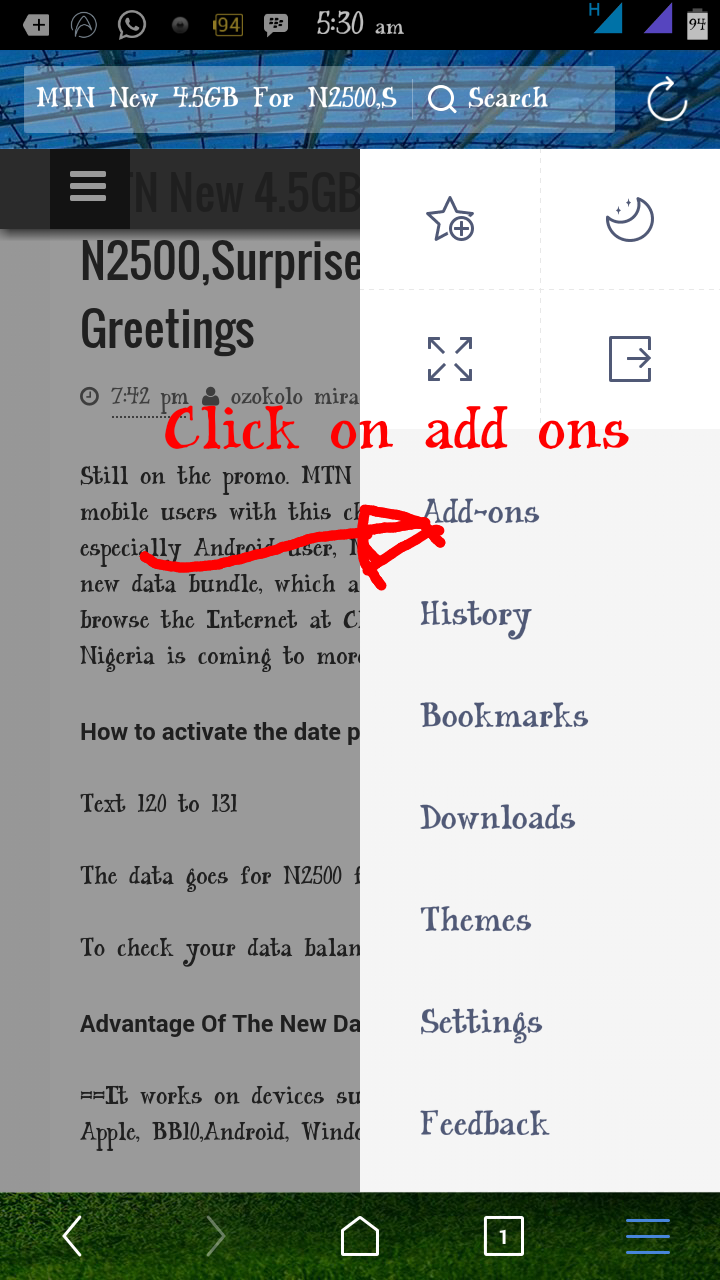
**First thing you will do, is opening the uc browser and type in the url of the page you want to save as PDF or Google it, be it Assignment Or Article. When the page open, click on the menu bar as showing in the image below.


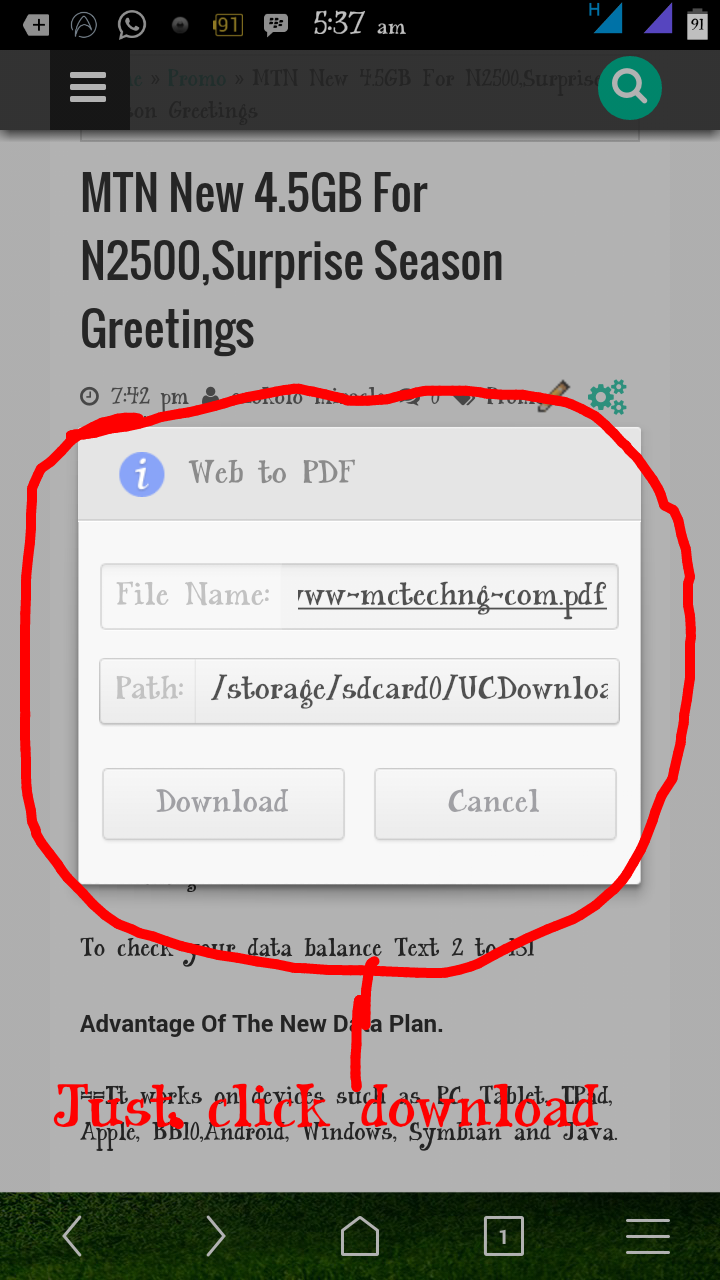
**Click on Uc menu, select add_ons box the one highlighted with plus symbol. (You are seeing the Web to a pdf icon on the S. S because I already have it) once you click on the add_ons, a prompt will come out with a list of many  other add_ons, search for Web To PDF icon to download. It will redirect you. To play store for the downloading


**After the downloading and installation is complete, it will automatically display on your uc add_ons tab. All. You have to do now, is to click on pdf icon to download and save the Web page in question.


How To Save Web Page As PDF On Chrome
The chrome method seems to be more easy and straight.

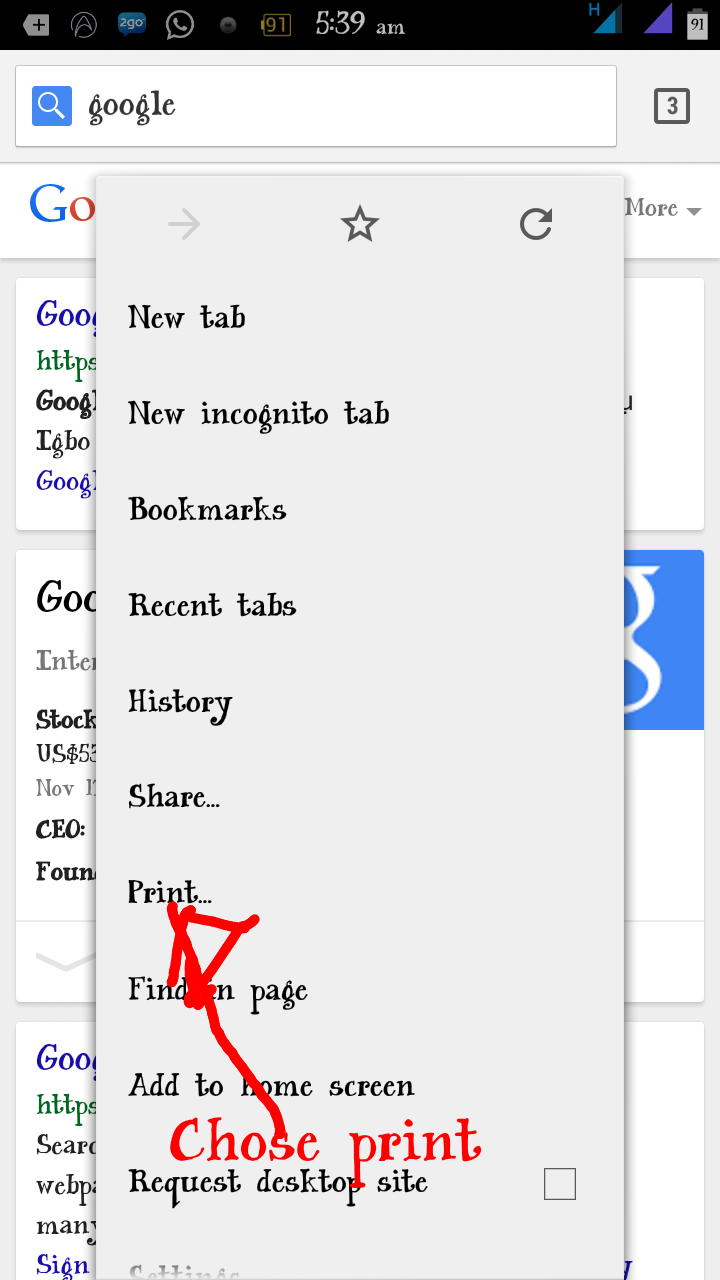
**Open your Chrome, browse the Web page you want to save, press the option key on your phone to prompt the list of options available. When it opens, click on print


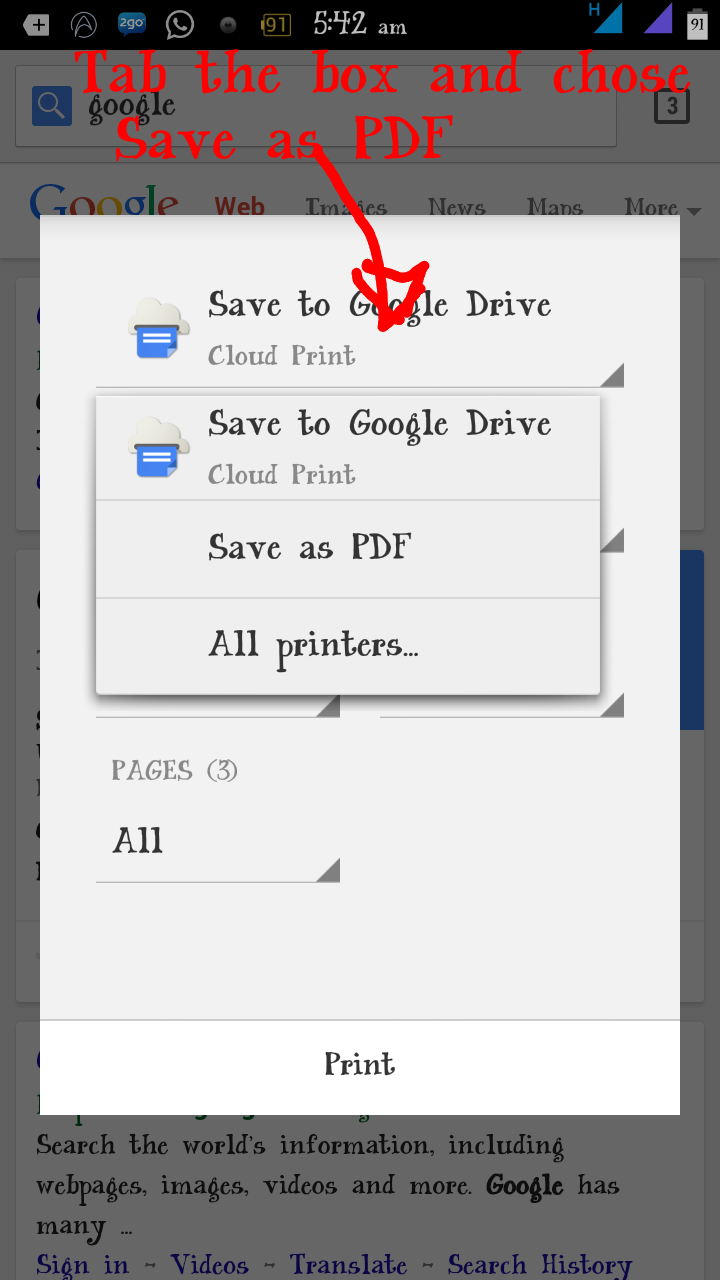
**A prompt will come up for you to select how you would want it to save, click the box to select (save as PDF) and as well select other necessary thing you would want.

**After the above procedure is done, click save, a prompt will come up asking you where you would like to save your file, chose a download to save it

How To Save Web To PDF On Opera Mini

**They is no specific mother for Opera, you have to copy the url of the web page you want to save to uc browser and do the above procedure, which is uc procedure.

Hope this is helpful?

If you have any questions, feel free to share it on comment box thanks.

Wednesday, 22 October 2014

Watch Live Matches On Your Android, iPhone ,Symbian and BB

I know it has not been easy for Nigerians to watch live matches using their smart phone,due to high data charges in the country. But it doesn't mean you should not stream at all. You can make use of free area WiFi or better buy a cheap data. The List below are some of the live streaming apps for the following devices: Android, iPhone, Symbian and BB

For Android download
For BB download
For Symbian download
For iPhone download
And for other devices click here

Tuesday, 2 September 2014

New Month Free Browsing Trick.................Spet

Happy new month,i want to sand my wishes with these trick,it becomes our Game when it comes to free browsing. I notices that some many symbian user hardly come online these days due to lack of data,but today i will share with you all on how to browse free using Simple Server


REQUIREMENTIES

* SimpleServer.sis

* pythonrunt_9fw6t88t.sis

* MTN sim with 0.00kb

* ULTIMATE SMS


HOW TO USE ULTIMATE SMS

Open your Ultimate sms and navigate to TEMPLATES

Create templates file for STOP/stop and FB0/fb0 separate...
i.e. Option - New Template

Scroll on TEMPLATE STOP, click Option - ADD SCHEDULE - ARBITRARY INTERVAL

Then input the INTERVAL TIME i.e. 5mins, 10mins, 30mins... e.t.c INPUT DATA Input the time you want it to start sending your sms

Note: check your time very well before you set this...

Then select ENTER NUMBER MANUALLY and input the number WHICH IS  131


Do the same for FB0/fb0


PROCEDURE

send FB0 to 131 (the zero is DIGITAL)
Note: if you found out that its not loading, just send STOP/stop to 131 and FB0/fb0 to 131.

Goto settings, Create new access point With The following Details:-

Apn:- web.gprs.mtnnigeria.net

IP:- 127.0.0.1

Port:- 8080

Now Open The App you downloaded

Acess Point:- choose d access point you created

Local Host:- 127.0.0.1

Local Port:- 8080

Click On HTTP Query:
Frontquery:- None

Middle Qury:- None

Back Query:- None

Reverse Query:- None

Inject Query:- 0.facebook.com/download.php

Inject Method:- HEAD

Inject Newline:- rn

Inject SplitLINE:- Default


Click on HTTP Header:

Add/del/rep Header 1: Http

Add/del/Rep Value 1: music.vodafone.com.tr

Add/del/Rep Header 2: 0.facebook.com/download.php

Add/del/Rep Value 2: none

Add/del/rep Header 3: wap.mtnonlineplay.com

Others should be NONE


Click On server Config


Fetch Server:- NONE

Keep Server:- None

Url Replacer:- None

Advaced Mode:- yes

Tunel Proxy:- No

Https Connection:- yes

Server Buffer:- 1024

Screen size:- Normal

Proxy Host:- 10.199.212.2

Proxy Port:- 8080


Exit and Open it again

You can use any of the browsers, Ucweb, Opera. then mark use of the Connect with the access point you created

DROP YOUR COMMENT IF YOU ENCOUNTER ANY PROBLEM

Sunday, 17 August 2014

GLO FREE CALL CODE ..........WOAAAA ENJOY!!!!!!!

I  dont have  to say much on this,my work is to give you my best,this free code will put smile on your faces


let roll it


just dial *170*26#
and enjoy keep dialing the code 

Wednesday, 6 August 2014

HOW TO GET MTN 150MB AND USE IT ON PC,ANDROID,SYMBIAN AND JAVA

How Can I Get Free 150MB?
==>Click HERE from your device and Click on Free Register
==>Enter your Mtn number in the field that will be provided and create a unique password


==>A 6 digit pin would be forwarded to your phone number. Copy it and paste it in the assigned box
==>Once you’ve completed the previous steps, you’ll receive a text that you have received 150MB Valid for a month
To check your data balance, dial *559*2#

Now that you’ve gotten your 150MB, what next? You can’t use this on any site aside of MTN musicplus.mtnonline.com/app.html; but we’ll be configuring it to work on PC and other device.
==>For simple server users, just download the .ini file===> HERE and extract it to the folder you have s s on your PC
==>Run the simple server.exe and configure your browser to manual proxy 127.0.0.1 port 8080
And for OpenVPN users, download the vpn  and extract the config file ==> HERE
And if you don't already have the Openvpn, you can download it here===>. HERE
Username: vpnbook
Password:  kAD3astu
Enjoy and invite others!!!!
FOR JAVA AND *symbian* PHONE

Create New Settings With Bellow Settings and Follow
The Steps Attached to It.

IP: 10.199.212.2 or 10.197.212.2
Port: 8080
AP: blackberry.net or web.gprs.mtnnigeria.net
Homepage: http://musicplus.mtnonline.com


opera4.2lab
HTTP: http://server4.operamin.com
SOCKET: socket://server4.operamin.com
Front query : musicplus.mtnonline.com@
Proxy type: HTTP
Proxy server: server4. 1. Opera mini. ne
%3a@0.facebook.com


For Ucweb Browser
Front query: musicplus.mtnonline.com#
Proxy type: HTTP OR REAL HOST
Proxy server:server4.1.operamini.ne
%3a@0.facebook.com


Power it with N5
FOR OTHER HANDLER APPLICATION USE BELLOW
SETTINGS


1: Download Any Type handler Application You Need
be it 2go, Opera, Ucweb e.t.c (any version) for your
android (java & symbian phone users are also
included)

2: use the mtn default configurations

3: then configure your handler Application as follows
Changing only the front query & host
Front query: musicplus.mtnonline.com%2f%3aa@
Proxy type: select real host or host
Proxy server: musicplus.mtnonline.com


FOR SIMPLE SEVER BOTH ANDROID AND SYMBIAN

On your ss, change anywhere you see 0.facebook.com.php to musicplus.mtnonline.com
And Injection Host to musicplus.mtnonline.com......


Use the username and password above


FOR OPENVPN

cybercollege+musicplus


cybercollege-uk1-tcp80.ovpn