Showing posts with label Tutorials. Show all posts

Monday, 27 April 2015

How To Download Photo And Videos On Instagram With Instagram+

Instagram+ is a molded version of Instagram with much different which I will explain later on this post.
What You Need To Know About Instagram+ OGmods

Instagram is a social media platform with a large number of users across the world, Instagram as the main app dose not have any molded future, its normal and plan, you can Share your photo, videos and tag your friends. but you do not have access to download photos nor video from people you are following.

Instagram+ was created by OGmods and it links to instagram platform  with a standard  security to ensure a maximum protection of users information like the Original instagram. with instagram+ you can Share photo and video like usual. but there is a spacial future included on the instagram+ which allows you to  download photos and videos direct to your android device.

How To  Download Photo And Videos With Instagram 

==>Download and install Instagram+ Here

==>Open it and login with  your Password and username

==>Scroll down or up your instagram home page..... once you see any interesting  photo or video, tap on the three dot blow the photo or video and select download to start the download. as shown in the image above

==>All downloaded Photo and Videos are stored in the SD folder named OGmods

if you find this interesting, Share with friends !!

Monday, 20 April 2015

How To Flash Cwm Recovery On Bricked Infinix Hot Note_scatter file

Brick of mobile devices has become the order of the day, many complain coming up each day and hour about the New infinix hot note. User said their phone got Bricked on the process  of OTA System update while some got their phone Bricked when trying to Flash one file or the other. On the other hand, most of the complaint is about the OTA update which I think the company should look into it.
Fix bricked Infinix Hot Note


How this tutorial I will you teach, how to flash Cwm recovery on your Bricked Infinix Hot Note to enable you to restore your backup.

Requirements For The Tutorial

==) SP flashtools. Download HERE.
==) Adb drivers. Download Here
==) Infinix hot note scatter file Download HERE


INSTALLATIONS

==) Download and install the adb driver from the link provided above

==) Download infinix hot note scatter file as well on the link above

==) Download SP flash tool, and extract to your desktop

==) Double click on the extracted sp flash tool folder and open flash_tool  (the green icon)  as an administrator
Fix bricked Infinix Hot Note

==) Click on scatter loading and navigate to the location of your scatter file, then open.
Fix bricked Infinix Hot Note

==) Uncheck the other box, leave only the recovery and click on location no(7)
Fix bricked Infinix Hot Note

=) Select your cwm recovery and click on open.

Fix bricked Infinix Hot Note

==) Click to download and Turn off your phone and connect it to your PC while holding down the Vol + and button.
Fix bricked Infinix Hot Note

==) You will notice a color loading bar, just allow it to finish and an okay menu will prompt Just disconnect your phone and try booting into recovery..

Learn how to restore your cwm backup 

Sunday, 19 April 2015

How To Replace Gmail App With Inbox By Gmail On Android

In this tutorial you will learn how to replace Gmail app with Inbox by Gmail  on Android devices. It annoys the most to get double notification of a single mail on your android phone just because you want to use the Inbox by Gmail while you still have the System Gmail app installed on your device
how to replace Gmail app with Inbox by Gmail

Don't worry,I will put you through on how to remove System Gmail and replace it with Inbox by Gmail,

Some Requirements 

==) Rooted android device
==) link2sd
==) Uninstaller  apk or root Explore from playstore
==) Inbox by Gmail downloaded and installed on your device

Instruction On How w To  Remove System Gmail 

Using  Uninstall  
1) Open your uninstall app and locate the Gmail app
2) Tap and hold the Gmail app, an option will come up.
3) Then, Select uninstall app and wait for it to finish, after that reboot your device

Using Root  Explore
1) Open root Explore  tap on root and scroll down to System
2) Tap to open the System folder, scroll and select App, on the app folder you will find most of the android apk. Search and find Gmail
3) Tap or mark it and delete, once is done reboot.

How To Install Inbox by Gmail 

==>Download Inbox by Gmail at play store, install it and move to phone Memory
==>Download like2sd and install
==>Open like2sd and locate your Inbox by Gmail, tap and hold on it and an option to prompt with many options.
==>Tap on make System App and wait for it to finish, you will be asked to reboot
==> After that you are good to go with Inbox by Gmail as the only app for your Gmail messages

But if I many ask, which, among the two Gmail app do you prefer? Drop your comments. 

Saturday, 18 April 2015

How To Leave Whatsapp Group Or To Make A Group Member An Admin

I notice that some people do not know how to leave a whatsapp group or even make someone an admin on whatsapp group, on this tutorial you will learn how to leave whatsapp group or to make a group member an admin.
How to leave whatsapp group

Below are some of the reasons why many people leave a whatsapp group

1) Uninteresting  Group topic
2) Large number of messages pop-up
3) It hangs phone sometimes when the group  messages is much
5) Some don't like it due to data usage

How to Leave Whatsapp group

1) Tap on the group or click on the group to open
2) Press option to Select group information or tap on the group header if you are using android
3) Once the group  information shows up with the list of people in the group, scroll down to the bottom where you will find EXIT GROUP.
How to leave whatsapp group
4) Tap or click exit group followed by DELETE GROUP.

After the above procedure you will totally leave the group and you will not receive any notification from the group

How To Make A Whatsapp Group Member An Admin

1) Click or tap on the group to open, press option to Select group info
2) Scroll down to the name you want to make an admin.
3) Tap or click on the name, an option will prompt with name options available, tap or click on add to group admin to add the person. ( Should in case you want to remove a group member, you will find remove member on the option)

How to leave whatsapp group
Hope you find this helpful, always Create a group with a vital reason.

Thursday, 16 April 2015

How To Unbrick Your Bricked Infinix Hot Note

On this tutorial, you will learn how to unbrick your bricked INFINIX  HOT  NOTE  without much stress, but you need to read this tutorial carefully and follow it step to step
unbrick your infinix hot note

REQUIREMENTS
==>Rooted Infinix Hot note
==>CWM Recovery installed on your phone
==>SD Card
==>Stock Rom(Cwm backup)

How To Un-Brick Your Infinix Hot Note

==>Download the stock ROM for INFINIX HOT NOTE 
==>Copy to your SD card (root folder)
==>Boot your phone into recovery mode and install the downloaded stock ROM according to the procedure below

Note before you continue, make sure your battery is upto 70%

FLASHING PROCEDURE
==) Boot your phone into CWM Recovery Mode (Power Off your Phone and then Press and hold  Power Button + Volume Up Button until it boot to Recovery)

 Follow below steps for flashing Cwm ROM

==) Wipe data/factory Reset
==) Wipe cache Partition
==) Advance/ Wipe Dalvik Cache
==) Mount & Storage/ Format System
==) Now Press Back
==) Choose Zip From SDcard
==) Install Zip From SD Card
==) Select your Custom ROM which You want to Flash and wait for the Installation to finish
==) After, Then Reboot Your Phone and you are through

 should in case you cannot  boot to recovery, do the following procedure

==) Download  PdaNet @http://pdanet.co/a/
==) Download MTK Droid tools here
==) Manually Install MTK / Vcomm drivers Windows 64bit, Windows 32bit
==) Get the boot.img for infinix hot note
==) Still with the phone connected, extract and launch MTK Droid Tools on your Pc by clicking on (green logo)
==) MTK Droid tools should display your phone's details and the box at the bottom should be yellow
==) If it doesn't displace, ensure the drivers were correctly installed then boot the phone into factory mode (volume down + power button)
==) MTK should now detect and display the phone's details
==) Click ROOT at the bottom, select Yes and Grant to any prompt on phone or PC and wait till the box turns green
==) When the box turns green, click on the root, backup, recovery tab
==) Click to choose boot.img file
==) Click Recovery and Boot then navigate to the boot.img  and select it
==) Click yes to every prompt
==) When asked, click yes to boot into recovery mode
==) now you have Clockworkmod recovery installed on the bricked Infinix hot note from which you can do a restore,
==) Wipe cahe partiton
==) Wipe davlink cache
==) Reset to factory state or flash a new stock which you can get from the link above.

in case if you encounter any problem, please drop a comment.

Wednesday, 25 March 2015

Update_WhatsApp Reborn 1.80 Plus AntiBan_Best WhatsApp Plus Apk 2015

WhatsApp Reborn 1.80 Plus AntiBan Proof Material design was created to suite you and other whatsapp plus users, below are some spacial thing about whatsapp Reborn. 

Features
==) Fully customization/themi options available from changing icon to change whole look of whatsapp by applying and creating themes
==) Upload videos upto 30 MB , Images in original resolution (No compression) Media sharing options
==) New  MATERIAL DESIGN implementation
==)  Privacy  features Hide blue ticks
==) Previews options for images and videos (like there is in iOS)
==) In-App group statistics
==) Get notified when your contacts go online
==) And many more mods
Best whatsapp plus apk available 2015

How to install whatsapp rebron 

1) Open Whatsapp & Go to Settings→Chat Settings→Backup Conversations
(Note: its very important to backup your conversation)

2) Uninstall your WhatsApp which you downloaded from playstore

3) Download & Install  WhatsApp Reborn's apk.... Here

4) lauch it and tap on  AGREE & CONTINUE, Enter your number for number verification

5) after that, you can restore your backup, the backup might take time to restore depending.

6) Press Continue after it  finishes


8) in case you encounter application not installed, do the follow 

Open your root Explore go to root, scroll to vonder folder, open it and tap on operator, tap on app, look for whatsapp apk and delete it then restart your phone and install the whatsapp Reborn 


Congratulations you successfully installed WhatsApp Reborn..... Share with friends 

Saturday, 14 February 2015

How To Change Android Font Colour-With Ifont Module

Hello on this tutorial, I will teach you all about how to change android phone font colour, this tutorial will be very vital to those who love tweaking their android phone, if you are one of them just sit back and let unfold the article


But before we start I would like to state these clear in your understanding. Note!!!! I'm not responsible for any brick this might case to your device. Always remember to backup your device before proceeding with this tutorial.

how to change  whatsapp color
Ifont on facebook

Requirements

*Rooted device or you can root here
*Xposed Installer which you can download here 
*Ifont module, which you can download here 
*Download Ifont apk  for playstore or you can use the module as font app

Steps To Install And Run Ifont Module

==) Install Xposed and update the framework.
==) Install the Ifont module which you downloaded earlier and reboot your device.
==) Now install the Ifont apk and launch it, select any colour of your choice and apply it. Note it will reboot your phone in order to apply the font.
==) Great you just applied a font now is time to change the font colour Base on the application you wish to change colour
==) launch the Ifont module through the icon on your phone menu now tap on my font and scroll down to colour font to select a font colour, when the window open for you to choose any app you want to apply font color on.
==) Once you tap on any app, a menu will come up for you to run the settings,

Tick
Enable
Font weight: set it to default
Tap on Choose Colour to select a color, just pick any colour of your choice and enable All text colour.
How to use ifont to chnage android font color

==) Almost done, new the app will automatically launch your app and you will see the colour working...... Hope you will make enough fun with this...

If you enjoy this, please share with friends


Friday, 9 January 2015

How To Enable Copy And Paste In CMD (Command Prompt)

In this tutorial I will be teaching you all about "how to enable copy and paste in CMD", you might know how or might not, but my main oppose is to teach those who don’t know about or have not heard about it before. I will make sure you understand all the steps in this tutorial, can we do it? Yes, then let move to the procedures to take


Step 1) You need to open CMD, or if you are using Windows 8, you can type in CMD in the search bar or better still  Press Win + X key to display and  select Command Prompt

Step 2) Now you need to Right Click on the Title Bar of the CMD window and Select Properties on the options just like the image below

Step 3)  After the above, a Popup Window will come up, just look at the Right hand side, Under Edit Options, and Check Quick Edit Mode box  and click OK to save your changes.
 Step 4) When you are through with the above, you can now be able to Copy any text from CMD to any place of your choice Using the command key  CTRL + C  or just right click to use your mouse to copy. While copying you will notice a white highlighted area.


Hope you understand the above procedure, this tutorial will help many computer users most especially programmers. You don’t need to type all commands, you can easily copy and paste it on the CMD wall and run your program. Copy and paste on CMD has been made Easy Enjoy and share with friends.

Thanks For reading….. Your comment serves as a feedback to us.


Tuesday, 6 January 2015

Four Best Computer Softwares To Use | 2015

Today I will share some important computer software which might be helpful to you in this year 2015, I know as we enter into the new month of the year, many people will be curious about what software to use, sure? You don't have to worry about that, because I will list some important software for you and how it works. Hope you will enjoy reading this?
SpeedUpMyPC Is a computer software and also, a maintenance app software that can scan a computer system for issues, and can clean up unwanted files, SpeedUpMyPC works in many ways, it can scan and fix computer issues, it can scan a computer hard disk and delete useful files making the computer performance a better one. You can Download SpeedUpMyPC here

Make use of this serial number below
SP-VPXM2-Q5UT2-3CM2Q-AKJR3-TPC76-UGFMC

Bitdefender Total Security : Is one of the  popular antivirus on the Internet, many users has testified how good and active Bitdefender is, it has many great features with a good user experience ,Download Bitdefender here

To-do Backup: Is a popular computer software with some basic features, To-do Backup enables users to backup and restore system files most especially in a critical state. You can Download and run Todo Backup on your computer system

Serial key NK7PG-L534L-CWRDK-I387G-TSFP7

Foobar2000: Is a player with wonderful virtual display, it's easy and common to use, foobar2000 has the following features
Supported audio formats: MP3, MP4, AAC, CD Audio, WMA, Vorbis, Opus, FLAC, WavPack, WAV, AIFF, Musepack, Speex, AU, SND... And more with additional components.
Gapless playback.
Easily customizable user interface layout.
Advanced tagging capabilities.
Support for ripping Audio CDs as well as transcoding all supported audio formats using the Converter component.
Full ReplayGain support.
Customizable keyboard shortcuts.
Open component architecture allowing third-party developers to extend functionality of the player. You can Download it here

If you think I should include a software to the above line up, please let me know in the comment box

Monday, 17 November 2014

How To Save A Web Page As PDF On Uc Browser ,Chrome And Opera Mini


Hi, In this tutorial, you will learn how to save web page as PDF on the Mobile Web browser such as:
© Uc Browser
© Chrome
©  Opera Mini


Saving Web pages as pdf has not been easy for any mobile user,but I will teach you how to do that step by step with a screenshot to help you comprehend it better. We will be starting with Uc browser

How To Save Web To PDF On Uc Browser.
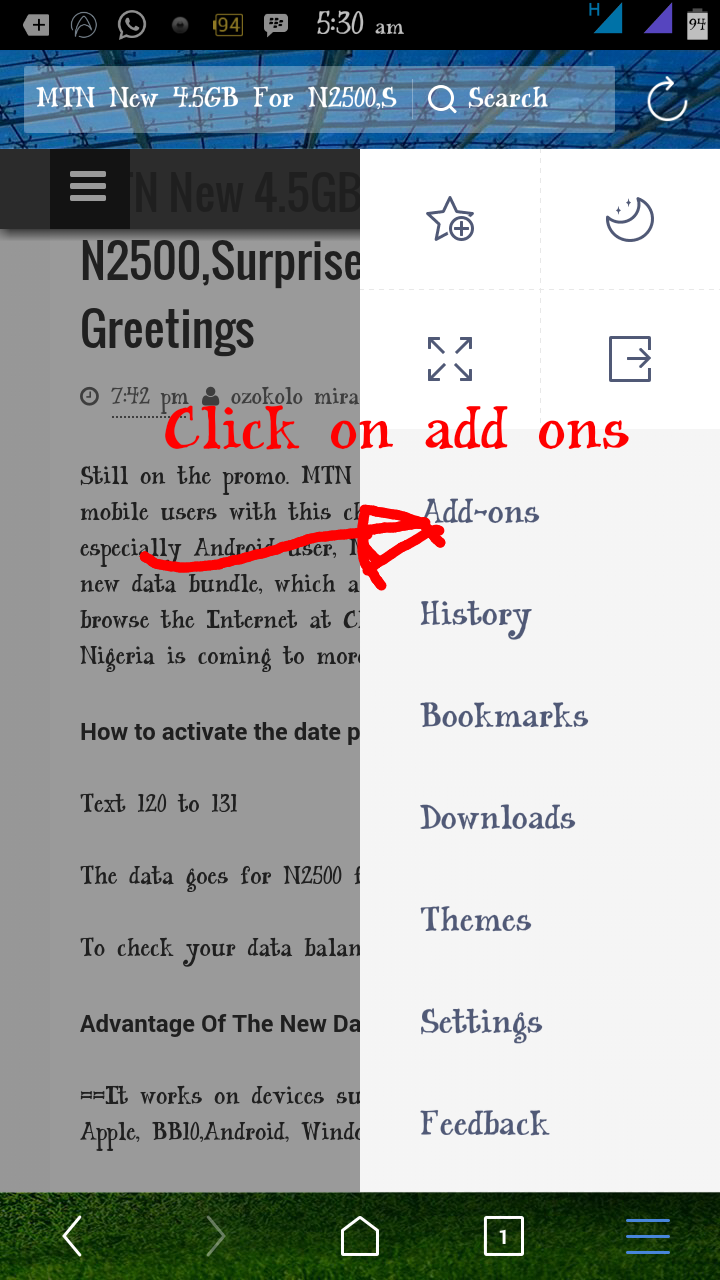
**First thing you will do, is opening the uc browser and type in the url of the page you want to save as PDF or Google it, be it Assignment Or Article. When the page open, click on the menu bar as showing in the image below.


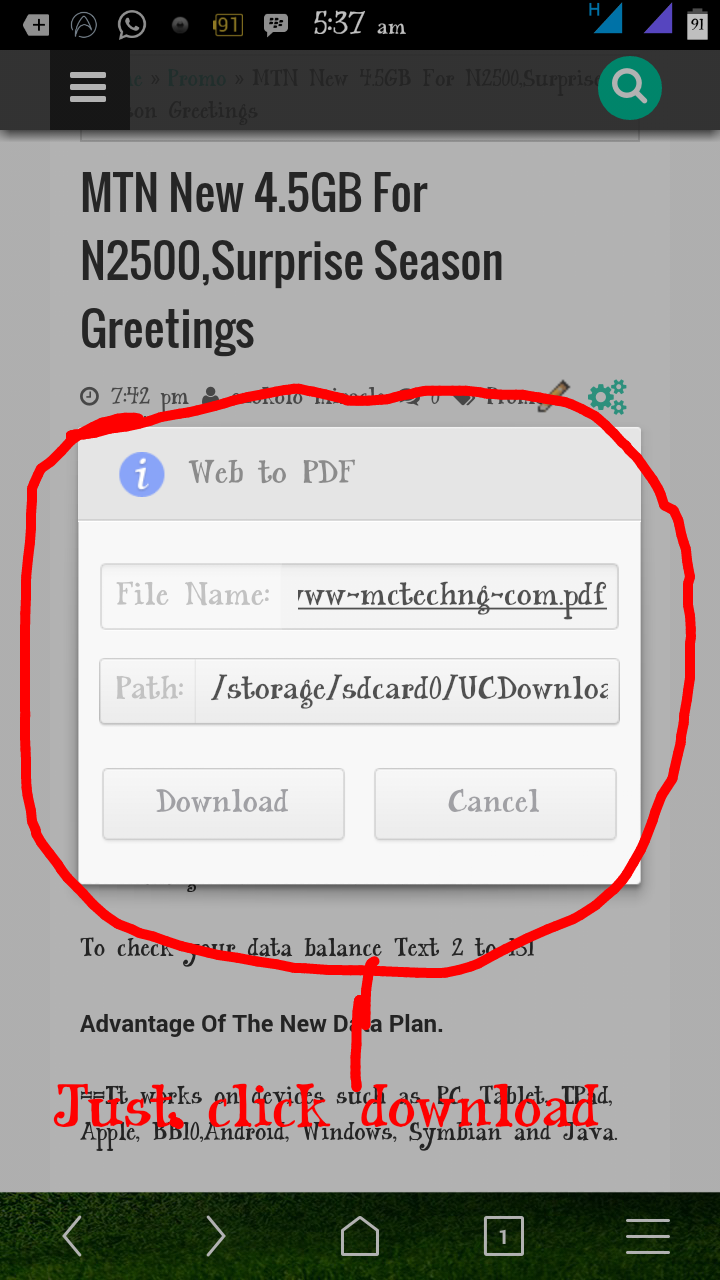
**Click on Uc menu, select add_ons box the one highlighted with plus symbol. (You are seeing the Web to a pdf icon on the S. S because I already have it) once you click on the add_ons, a prompt will come out with a list of many  other add_ons, search for Web To PDF icon to download. It will redirect you. To play store for the downloading


**After the downloading and installation is complete, it will automatically display on your uc add_ons tab. All. You have to do now, is to click on pdf icon to download and save the Web page in question.


How To Save Web Page As PDF On Chrome
The chrome method seems to be more easy and straight.

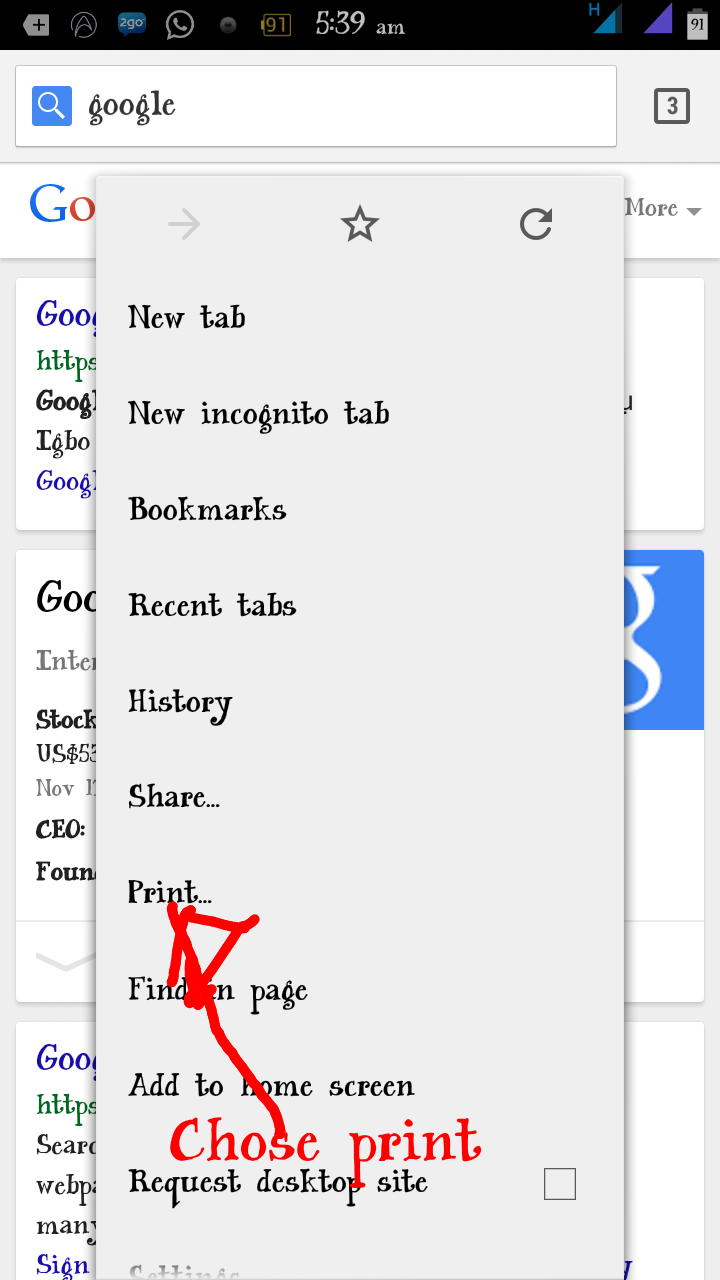
**Open your Chrome, browse the Web page you want to save, press the option key on your phone to prompt the list of options available. When it opens, click on print


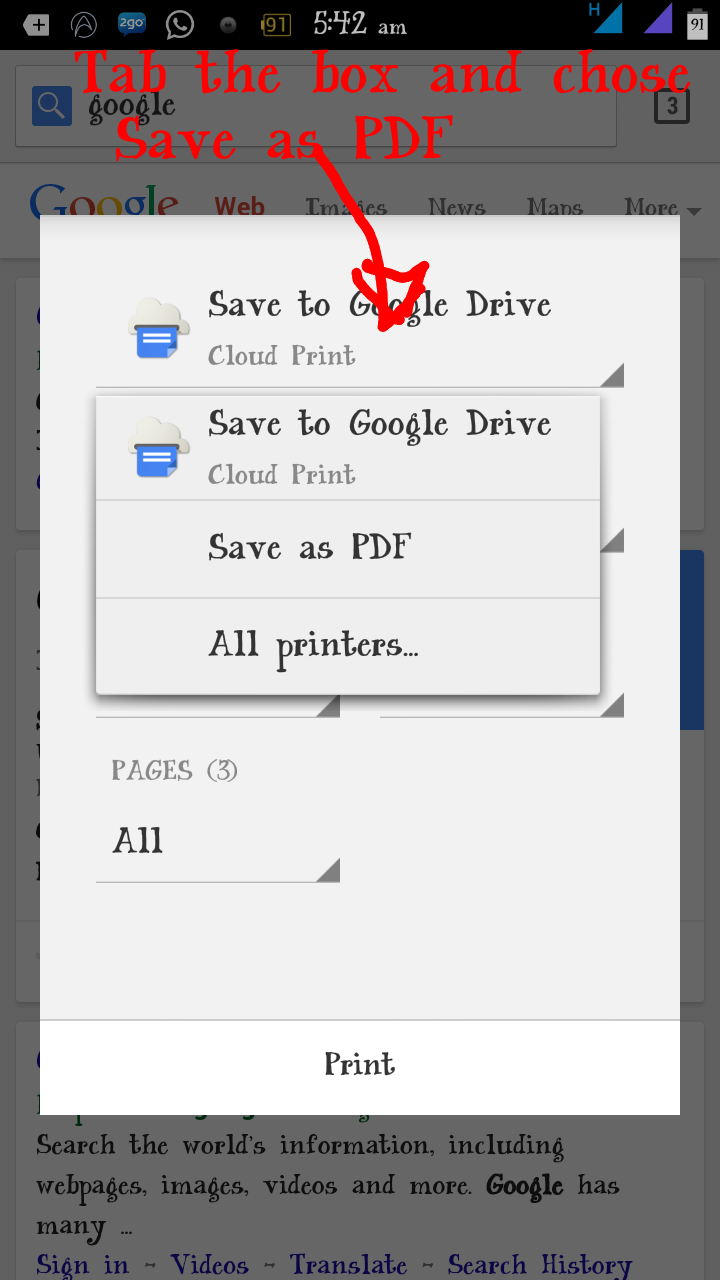
**A prompt will come up for you to select how you would want it to save, click the box to select (save as PDF) and as well select other necessary thing you would want.

**After the above procedure is done, click save, a prompt will come up asking you where you would like to save your file, chose a download to save it

How To Save Web To PDF On Opera Mini

**They is no specific mother for Opera, you have to copy the url of the web page you want to save to uc browser and do the above procedure, which is uc procedure.

Hope this is helpful?

If you have any questions, feel free to share it on comment box thanks.

Wednesday, 12 November 2014

How To Install Fonts On Android device

Hello,........ I would like to share with you all some font customizing tips, customizing is a part of the fun. Have you been browsing all day looking for a way to install fonts on your Android device? Don't worry, you are on the right place.... Just a few steps!

Requirements
==Android device
==Rooted Device. Learn how to root here
==ifont or any other one

Note!!!
I recommended that you backup your phone before taking any step below.
Steps on how to install fonts on your Android device.

== Download ifont donation here
== install it and move to internal memory (phone memory)
== lunch the ifont browse through the font and download the one you would love to set on your Android device. When that is done, the event would ask you to reboot, click OK to reboot. After that your phone will come up with a new font look. You can as well test other font in ifont


Don't be a wallflower, Please let me know if you encounter any problem doing the above procedures.

Wednesday, 5 November 2014

How To Stop Background Running Apps On Android Phones

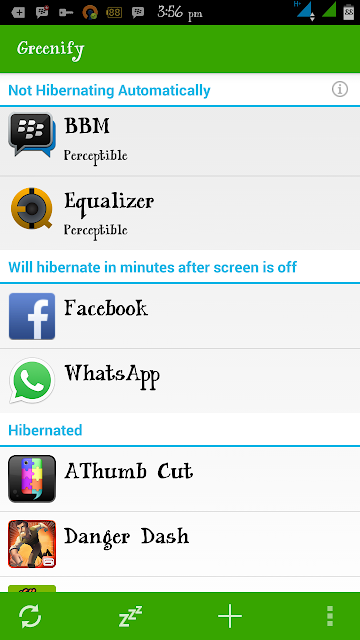
Hello through my research yesterday I was able to come up with this amazing app called Greenify. Greenify is one of the best power saving apps, as well block background running app from wiping your data. It gives you the ability to turn off some app making you  the master guide of your phone. 

How To Install 
1 Download Greenify Donation Here
2 Download and install Xposed installer:http://goo.gl/CKTWXZ3. Install the “Framework" in the "Xposed Installer" and activate "Greenify" in "Modules".
3 Reboot
4 Select "Experimental features" from the main menu of Greenify, enable whatever features you want.
Experimental Features 
Boost mode
Android framework is patched to allow Greenify to perform hibernation and other operations without the root routine, which is usually buggy (for some root tools) and slow.
Allow (mostly) system appears to be greenfield in Greenify
Android framework is patched to deprive system apps of immunity to hibernation.Beware, most system apps are critical to the basic functionality of your device, once greenfield, you may lose some part of usability. If something bad happens, degreenify the system apps you recently greenfield and reboot, or deactivate this experimental feature of Greenify and reboot.
Allow GCM push message to wake hibernated apps
The Google service framework is patched to allow the GCM (Google Cloud Message, a.k.a. C2DM) broadcast to wake the hibernated apps, thus you can greenify some apps without losing the ability to receive push message.
Attention: Not all apps use GCM as push mechanism, some apps create their own connection for push in background service, thus can't benefit from this patch and their push messages can never survive hibernation. Please DO NOT ask for that, it's just a "mission impossible" in practice. Instead,ask their developer to adopt the more RAM-and-battery-friendly GCM push.
Keep Notifications after Hibernation
Android framework is patched to keep notifications from being removed when application hibernates.
Wake-up Tracker
Android framework is patched to track which app implicitly woke your hibernated apps. You can decide whether to cutoff the wake-up path to avoid further wake-ups.
Block App State Abuse.
Block the abuse (via a vulnerability of Android up to 4.2) used by some apps to keep themselves from being killed by Android. This abuse leads to undesired apps "Not Hibernating" due to false "Perceptible" state in Greenify.
PS: For Android 4.3+, this can also remove the annoying permanent notification from some apps, which was hidden in pre-4.3 system.
Why do I need to install another framework for all these to work? 
Since these experimental features all need OS level patches, traditionally they can only be applied with ROM Modding, which device is highly-specific and ROM-exclusive. Xposed framework is a new hope to do fine grained tiny patches in a ROM-independent way. Thanks to Xposed framework, you can enjoy these experimental features of Greenify without replacing your ROM.
If you have any problems installing it, please comment for a help.


Monday, 3 November 2014

Android L 5.0 Gmail Apk Is Out, Would You Like To Install It


Everybody wants to have this Android L 5.0 by all means, would you like to install  the Gmail style of L 5.0 on your Android too? I guess yes. Today we will be  sharing a downloading link of the new Gmail 5.. 0 and as well would like to hear yours
Viewpoint  about it, through the comment box.. .. All thanks to the developers.


It makes your mail list more cute and lovely  you can download it at Here

Wednesday, 22 October 2014

Watch Live Matches On Your Android, iPhone ,Symbian and BB

I know it has not been easy for Nigerians to watch live matches using their smart phone,due to high data charges in the country. But it doesn't mean you should not stream at all. You can make use of free area WiFi or better buy a cheap data. The List below are some of the live streaming apps for the following devices: Android, iPhone, Symbian and BB

For Android download
For BB download
For Symbian download
For iPhone download
And for other devices click here

Update!! Download And Install Google L Keyboard On Your Android

Google L keyboard is now available for Nexus 5 7or any device running 4.4 rooted devices only, Bejunk over at XDA ported the keyboard and shared a flashable .zip that will give you the new keyboard with the Material Design theme.
This keyboard is assumed to work on all ROM base on 4.4k

If you have the Google Keyboard installed, you should uninstall it or delete it from /system/app, using explore then download the zip here and flash it in either with ClockworkMod or TWRP recovery. After you are done with that,go to settings in order to config this keyboard. Form, go to Keyboard Settings,>>>> Advanced (Expert) Settings and select “Material” in color scheme.
VID XDA
How To flash zip to your cwm
>>>Switch off your phone, and wait until it vibrates.
>>>Now boot into recovery mode, press & hold the following combination of keys together: “Volume UP + Home key + Power button”
>>>Use the “Volume  UP & DOWN” keys to navigate/scroll through the options in the recovery
>>>Use the “Power button” to select an option in the recovery
>>>Transfer the “.zip” you want to flash on your sdcard. The best way is to save the file in the root of the SD Card. But you can also save the file in any folder you wish on your SD Card.
>>>Boot into recovery mode [See instructions above]
>>>Now Scroll to “install zip from sdcard” and select it.
>>>Select  “choose a zip from sdcard”.
>>>Scroll to the file and select it.
>>>Now confirm installation by selecting “Yes — Install flashablezip”
Once the installation is complete, go back and select “reboot system now” and enjoy

Sunday, 12 October 2014

How To Change Your Android IMEI With Mobileuncle Tools


How to change imei number by using mobile uncle tools

NOTE: It only works on rooted mtk 6577/6575 smart phones.but you can chnage Infinix imie with out rooting

As-usual this post is only for your information and i may not be responsible for any of the misuses done by you and we are not responsible by anyways.

WHAT TO BENEFIT: -
- You will enjoy using BB BIS Subscription on your android. (NB: only glo bis working for now)


Requirements:

-Works on rooted mtk android smart phones only
-Mobile uncle tools
-A valid email number

DOWNLOAD:mobile-uncle tool

Procedure:
1- Go to Engineer mode in the mobile Uncle tool. and click Engineer mode

2- Select Engineer mode[MTK]

3- Go to CDS information


4- Select Radio Information

5- Select the phone 2 (if you want to change sim2's imei number)

Here you can see a command line with “AT+........”.
Now just add this command to it AT+EGMR=1, 10,”then 15 digits of YOUR NEW IMEI NO”
And press “send at command”button.

[ If you want to change the phone 1 IMEI just use this option

AT+EGMR=1,7,”NEW IMEI NO”]

Now you can restart the phone and enjoy your new IMEI NO.

If you have any doubt, please feel free to ask…

Or if it did not work for you, try using the PC method

How To Upgrade Your Nokia OS


Nokia is one of the leading phone in NIGERIA before tecno and other company took place,,, but still yet many are still using Nokia. I write this in order to carry along all my readers not minding the kind of cell phone you are using,  below is the procedure on how you can upgrade your nokia Os


HOW TO UPGRADE NOKIA OS

REQUIREMENTS

* USB Cable
* Nokia_pc_suite
* Nokia software update
*

PROCEDURES TO TAKE

install Nokia PC Suite and Nokia Software Updater on your pc

connect your cell  phone to your  through  USB Cable

run Nokia Software Updater

wait for it to confirm your phone and it update

when it has display your phone and it update

click and  wait for it download   and install..

after that your  phone will re-boot .

And will come up  with a new version...

NOTE: MAKE SURE U HAVE A GOOD NETWORK ..
YOUR  MODEM MUST BE CONNECTED .

Your Comment is your feedback

Thursday, 9 October 2014

How To Change Your IMEI and GET 1.5gig OF Etisalat Data For FREE!!!!!

 Readers no dulling grab your share before they block it, the steps below will lead you to a smiling planet, I meant it will make you happy and as well put smiles on your faces. I know it has been long i posted on this blog due to exam... But it's almost over. Let's go straight to the show, all you need is Android phone be it Tecno, HTC,Infinx etc.


==>Generate your imei
==>Change your imei
==>Get your MB
 
How Can I Get 500MB + Extra 1GB Every Month From Etisalat?

1) The first thing we need here is the first  8 digits of the Infinix Zero IMEI which is 35585906
2) Remaining 7digits. You can put any 6 digits you like to remain the last digit. E.g 011227 making it looks like this 35585906011227x
3) To get the last digits, go to this site here
4) And click on IMEI Number Analyser
5) Enter the 14 digit IMEI and click on a check, it will provide you with the last digit.
6) Copy it and tweak it to your MTK Android device. If you are new to tweaking IMEI, Click here or use the mobile uncle method.
7) Once your IMEI has been successfully changed, Send MID to 8186 and 500MB will be given to you.
Mind you, you’ll be receiving this 500MB every month for good 12months.
Not all ooooo, still follow me carefully.
Once you’ve received the 500MB, you can do the below:
8 Look for Tecno P3 IMEI, Tecno R7 IMEI, Tecno F7 or IMEI or Phantom Z IMEI, get the first 8digits of the IMEI and repeat the steps above for the Infinix Zero,
9) For Tecno F7 and R7 the first 8digits IMEI is 86115502 & For Nokia X IMEI, the first 8digits is 35304606
Finally Send Nokia X to 8186 and more MB will be given to you.


On the other hand, you can as well grad 1.5gigs of data by using samsung imei.
Drop your Email if you need imie

Monday, 15 September 2014

Easy Steps To Change Your Android IMEI Number

I know how young people  out there feels to have a cell phone yet no data to enjoy the Internet .I know how it pains, because i felt that way long time when i was a novice,but today on this tutorial i will open your eyes and as well teach you the easiest way to get over your past pain on data issues. Change of Imei is like unlocking the cheap browsing gate,the imei tweak allows you to use Glo BIs on your android and ISO Iphone device.


 Before we start Note this: you have to fully back up your device (cell phone) before proceeding with the below tutorial>


How to Know if Your Phone is an MTK Device 
MTK means MediaTek, and MediaTek is a chip manufacturing company, they are regarded as well known companies. Such as : Tecno, Infinix, and mostly all Chinese phone are MTK Devices.you can easily detect if your device is an  MTK Mobile phone only when you install mobile uncle, then launch it .under engineering tab, IMEI will show up on the option if its an MTK cell phone.

Requirements:
    PC
    Rooted Phone ,you can root yours here>>
    MTK Droid Tools v2.5 - download it MTK Droid
    Cracked Blackberry IMEI - You can generate here... IMEI G Software
    Android ADB Driver – Download Adb Driver Installer (Universal)
Here
here<< or >>here

NOTE!!  
Back up your phone
Write down your Original IMEI and keep it safe.

 How Will I Chang My IMEI

  1. Extract and open the MTKDroidTools.exe and run it as an Administrator
  2. Connect  your phone and make sure yours has a root access and have installed the correct Driver for your phone.
  3. Open the MTK Droid Tools, it will detect the information of your Device.
  4. Your IMEI will show up, but if an error occurs, it will not show  and you can use this tool to restore it.     
  5. Click on  ROOT button. That will temporarily have Root shell access on your phone in order for the script to work on the background. The color will change from yellow to green. It will prompt a window to gain root shell access    
  6. Now that you have the root shell access click on IMEI/NVRAM button and a new window will open after that you will then put your 15 Digits Blackberry IMEI Number you generated earlier,, (if you don't know how to generate it drop a comment)
       
 .Note: IMEI 1 DENOTES SIM 1 AND IMEI 2 DENOTES SIM 2. 
 Please due  change accordingly Then Press the REPLACE IMEI button and it will prompt a  window that shows "" replace your existing"" one after you are through with that, reboot your device and it will boot with the new Imei... Enjoy Glo BIS


If you are confused.... You know what to do? Just comment and I will reply to you

Thursday, 11 September 2014

Easy Way To Root Infinix Zero And All Other Android Device In 5seconds!!!


                                                  What is rooting of phone 
Android rooting is the process of allowing users of smart phones, tablets, and other devices running the Android mobile operating system to attain privileged control (known as "root access") within Android's sub-system.


The benefits of rooting android device 


A rooted Android phone has a lot of benefits. Such as: uninstall system apps to free up space, flash customs ROMs, change fonts and customize your phone etc

On this thread,i will teach many of you the easy way on how to Root any android phone within 5secs,the amazing part of the tutorial is that you can equally root the newly lunched Infinix Zero  
 With it.

How can i root my Infinix Zero and other Android in 5secs?  
Download Root Genius Install the app on your computer and Launch it.
Enable USB debugging on your phone (Go to settings>development>tick USB debugging) Connect your phone to the PC with a USB cable
The app will show your phone is connected
Click on Root and you are Done