Friday, 30 January 2015

Why Nigerians Love Glo Bis (And You Should, Too!)

Nowadays Android, iPhone and other mobile device has dominated Nigeria, but due to high rate of data charge, people find it difficult to browse the Internet on their mobile devices. I understand the pains of some people" I felt the same sometime you might have a small amount of data hoping it could do something for you, but at the end it might as well wipe your credit.
Why Nigerians Love Glo Bis (And You Should, Too!)

Today I will tell you why you should love GLO BIS both for Android and iphone, before going to the main propose, I would like to share a true story.

It was on Saturday 6/11/2014, I met my friend at the street side sitting down like a sick bird. I asked dear friend what is wrong with you? He reply in a low tune dear Ozokolo Miracle honestly I regret having an Android phone. I was like why? What made you say that? He said ever since he brought his Android phone, that he has been experiencing hardship. I laughed and sit down near to him,i asked him, tell me its because of data bundle? He said yes and I laughed again funny at the time he laughed with me and he started telling me how his network provider due wipe his credit once he exhausted his data bundle, I felt pity for him just because I had the same experience.
   Dear reads I know many of you have pass through such? Today I will teach you yes you!!! How to use glo bis on your mobile phone.

How to make glo bis work on your Android and on iPhone device.

==) You need to subscribe for Glo Bis, which you can do by loading N1000 on your glo sim and Text COMONTH to 777. Data size 3GB!!!
==) After the above, change your phone imei to a blackberry imie, yes I know you will ask how? You can Download Bb imie Generator Here
And  learn how to change Android imie to bb imie , but if you are an iPhone user.  You  can change your imie to bb imie 

==) Once you have successfully changed your imei now change you
 Apn to blackberry.net and enjoy a better Android life.
I sense something here window and Symbian user are not happy, because their can not use this. Well I will find a way for you guys, for the main time hold on with this MTN Bis with Simpleserver

If you found this helpful, please share with friends. Thanks for visiting!!!! 

Tuesday, 27 January 2015

New Update On Android Facebook Page Manager Application

Hello readers. I want to share my observations with you all. I noticed that Facebook made some changes on their Android Facebook page application, which I know some of you might have noticed. I will write down some changes on the app and the importance.
New update on Facebook Android page manager

Facebook has a big role to play in the social cycle, the company has become more popular in the worldwide that even an average can create and run account on Facebook without much difficulty. Facebook is seriously updating their platform both apps and web..... Even in the privacy policy 

The new update on an Android Facebook page is very awesome, it gives users more reason to manage a page while on the go. I love this update because  it's one of my favorite apps. Below are the list of the features or changes as you may understand it.

Insight bar : this allows you to check your post engagement with users and people on Facebook, it analysis your post activities. Let me put it in this way, it works like Google analyser, the new update is now more standard and easy to understand.

Massages bar : The massaging window is now like an instant messaging apps, it has made chatting more easier between fans and page admin. Is more understandable, remember the best way to keep an audience is by list or reading their feelings or letting them have a medium to communicate with you has the administration. 

Notifications bar: The new notification has been amazing just like the normal app notification bar. With the new notification bar on the Facebook page app you can easily navigate through fans comment and likes notifications.

More bar: At the bar, you can find as follows
==) Activities for your page which includes, New likes, Comments etc.
==) You post tag which comprises, Scheduled post and default post
==) Asset which includes, photos and event of your page.
==) Other contains page feeds and setting. The feeds are always a meat for activity checking while the setting is where you can suggest what your page should be like or add an admin

My Questions, Do you think Facebook should add. More features to the Android Facebook page application? 

Sunday, 25 January 2015

The Introduction Of WhatSim For Unlimited Chat On WhatsApp Instant Messaging

WhatsApp has got many reasons to grow more higher, WhatsApp is one of the popular instant messaging with over $19. Millions users, days ago WhatsApp CEO promised a calling feature and  privacy settings has been updated to keep things going smoothly.
 Whatsim
Image got from WhatSim page 
Recently WhatsApp introduced a Web Version of the app. And now they also launched a SIM card called WhatSim, this SIM is specially made to suit the needs of users with free unlimited chat for the popular instant messaging app, I know few might not value this SIM, but many have gotten a better reason to make use of it. 

How would this WhatSim work? WhatSim will automatically connect to over 400 network providers in 150 countries. You don't have to worry about network signal, because the company has been doing great work to provide a sound coverage and signal to stay you connected all time and hours with other WhatsApp user such as families and friends etc. I think this is a great achievement, it has lower the cost of data wide world.

How can I get this WhatsApp?
WhatSim is sold at  €10 only, but more affordable in some countries. Like I mentioned above, it allows you to chat unlimited, which means you can equally share audio, video and pictures as you like. Believe it, it's a nice achievement and we hope for better more.
Source..... PR Newswire 

Friday, 23 January 2015

WhatsApp Officially Introduced A Web Client(WhatsApp Web Version) For Chrome

WhatsApp has officially launched WhatsApp Web client(Web version) for chrome, but not yet  available for other browsers. These new update/ feature is a great impart to WhatsApp users at least People can now chat while on other social media, below is a simple procedure on how to use WhatsApp Web client (Web version)  
whatsapp web version
==) Visit WhatsApp Web client 

==) And allow WhatsApp Web client to  authenticate your mobile device and load your instant messaging on a Web window.

==) A prompt will come up with QR code
Code scanner, now you need  to launch your mobile WhatsApp app according to your mobile operating system.

Android user can active theirs  by: launch WhatsApp and Tap on the Menu, scroll to Select (WhatsApp Web) and wait for it to sync


Widows phone user can active theirs as follows: launch WhatsApp and Tap on Menu, scroll to Select (WhatsApp Web).... Then wait for it to sync

Blackberry user can follow up a prompt instructions in other to active theirs.

Note!! Web version of WhatsApp is not available for iSO(iPhone)users, also make sure that your mobile WhatsApp app is updated to the latest version. 

Whatsapp Web version

Few Things You Need To Know About WhatsApp Web client 

==) It automatically sync your media shared on chat, such as picture, audio and videos.

==) WhatsApp Web Version will keep your phone connected to the Internet while chatting on the Web (double charge)

==) It helps you to easily copy and past article from Web to chat groups/personally.

Guess what?  You need to try this out and tell me what you feel about it. Share you thought or suggestions on the comment box 

Tuesday, 20 January 2015

MTN Bis Now Working On Android With Simpleserver And Proxydroid

Notification: This post was edited on 14/02/2015, Symbian SimpleServer was added and proxydroid apk for another users..... Enjoy the update thanks 

Hello readers, I found out that some android user are still spending much on data, while they are many alternative  ways to browse with less money, in this tutorial I will teach you all how to browse unlimited with MTN BIS, let kick rolling by listing all the necessary things to use in this tutorial.
Browse unlimited with mtn bis


Requirements 
--An Android device runs from 2.3 and Above
--A work network 
--MTN SIM Card
--SimpleServer which you can download here
--Symbian users can download simpleserver.sis  and configure as written in the below simpleserver configuration 

Install SimpleServer And Configure It As Listed Below 

After downloading simpleserver install and launch it, Tap on settings and configure it as the follow below

>>>Listen port: 8080
>>>Proxy Host: 10.199.212.2
>>>Proxy Port: 8080
>>>Enable Proxy: YES
>>>Injection Method:HEAD
>>>Injection Query: http://web.blackberry.com
>>>Injection Host: web.blackberry.com
>>>Injection line: Just press enter 4 times and
>>>Leave it empty
>>>Click Ok
>>>Enable Injection: Tick to Enable
>>>Buffer Size: 8092
>>>Log Level: DEBUG

Proxydroid:

after setting the above simpleserver, download proxydroid apk  and configure it as follows for it to power all app on your device:

Host: 127.0.0.1
Port: 8080

If you find any difficulty doing the above just comment in the box below and i would be glad to help you

Saturday, 17 January 2015

Best Data plan To Use On Your Devices

I will be glad to list some important data plan that might interest you, with some great reason why I chose it for you. Let roll down to the article with no delays.
Airtel NG launched a new awesome date bundle which goes for 3GB for N1400,which I think will be a better data plan for those who find it difficult to tweak cheat like others.
You can subscribe by Dialing *431#
This Plan can work on other devices as well, if in case if fail to work, then you need to subscribe for the Airtel social week to help active the above date which is met for blackberry users.

Glo NG has been good to subscribers, they recently introduced a data plan that will suit their subscribers, which goes for N2500 for 4.5GB.

How To Get 4.5GB For N2500
@==The first thing that should come to your mind, is how you can migrate to Glo overland plan, which you can do by dialing *200# to migrate.
@==Recharge your Glo SIM with 2,500 (you might get a bounce for that)
@==after you successfully recharged your SIM, dial this code *127*58# to active your 4.5GB.


I want you to know, that this data plan will work on all Internet enabled devices

MTN NG recently introduced an app as well as a plain called better me, which might be a great alternative help you many mobile users who will to get a better value out of their money, MTN better me is good, and I would advise some many of you to go for most especially businessmen and woman who make a lot of call on a daily basis

The better me plan is as follows:
==) Daily bundle gives you 20min, 15mb and 35sms N250
==) Monthly bundle gives you 100mins, 300mb, 100sms N2,015
==) Monthly data bundle gives you 2015MB for N2,015:

You can still go for MTN night plan or better still, make use of Mtn is  unlimited for just N100

Etisalat NG is one of the three network providers in Nigeria, which offers their best to make their subscribers help as well as other providers are doing, they have cheaper data plans as other did. But I most say "Etisalat has being no go area for creakers"

Below are goodies and data plan to use 

==) Chat pack:  This pak is meant Whatsapp, Facebook messenger, Wechat and 2Go; and it cost N 50 weekly N150 monthly.

==) Social pack: its the for online lovers, it's meant for Facebook, BBM, Twitter and Instagram. It cost N100 a day and N300 a week.

==) Video pack: this is an excellent opportunity for streamers, it allows you to watch movies and match on for just N400 for 2hours streaming.

You can still tweak your imie for 1.5GB or use the alternative methods

Friday, 16 January 2015

How To Browse Unlimited On PC With MTN Bis For #100

This tutorial I’m about to give is not new on the internet, but am writing it for a better understanding to some peeps reading my post each day and hours. I believe you all know about MTN BIS subscription and other Network providers BBM subscriptions such as: Glo and Airtel. Let drive direct to the procedures and requirements

REQUIREMENTS

PC

MODEM

MTN SIM with bis subscriptions (you can subscribe by sending BBCDAY to 21600 for #100)

SIMPLESERVER Download here

PROCEDURE

^^Open and extract simple-server on your computer or you can create a new folder and extract it in it.

^^Run Simple-server application on your computer and connect your modem to your PC

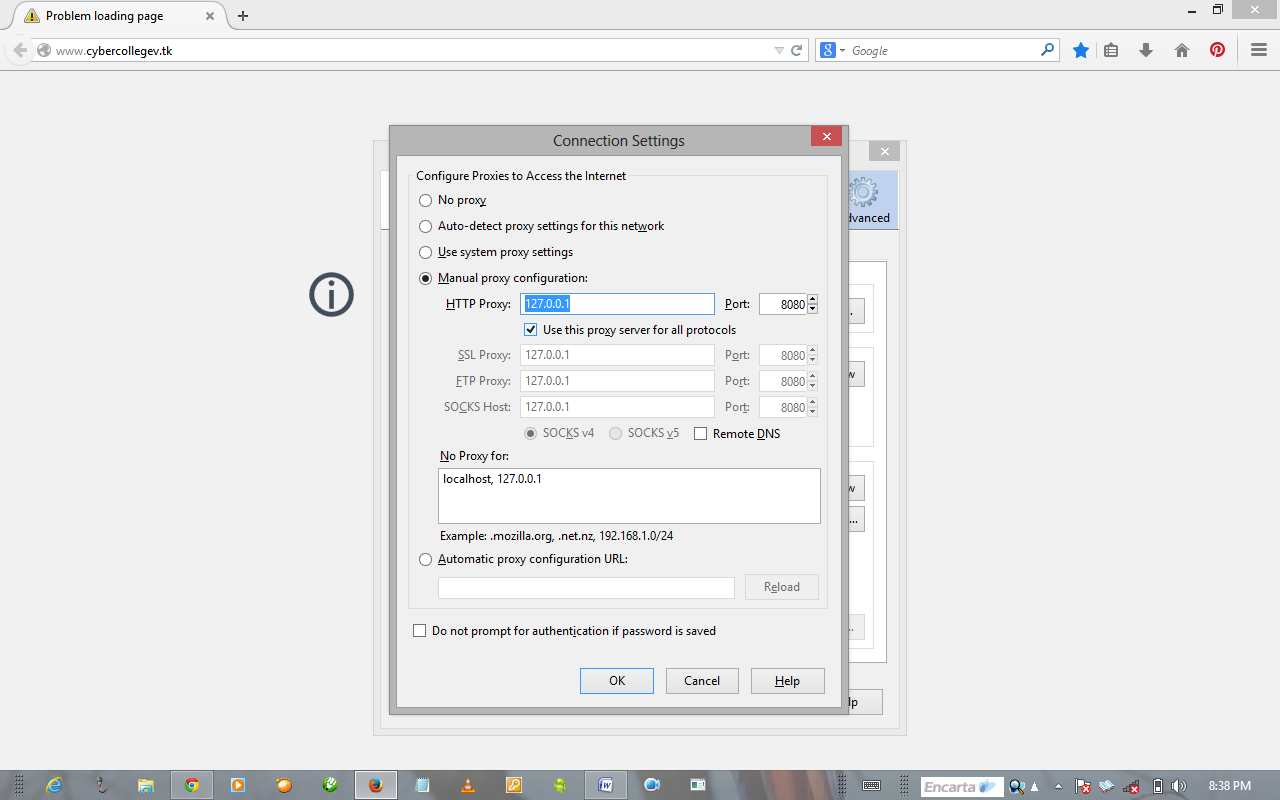
^^Open your Mozilla click on the menu, followed by options>>click on advanced>>> click on networks and select settings on the left side of connection title as shown below, after that a prompt will come up just check Manual Configuration and fill in the below 

HTTP HOST == 127.0.0.1
PORT == 8080
Don’t forget to check the box for “use this proxy server for all protocols

When that is done hit connect on your modem menu and enjoy
In case if you encounter any problem performing the above procedure, please make use of the comment box
Thanks